
LangChain PHP: How to Use LangChain in PHP (With Code)
There is no official LangChain for PHP. Here is what to use instead, with tested code: Laravel AI SD
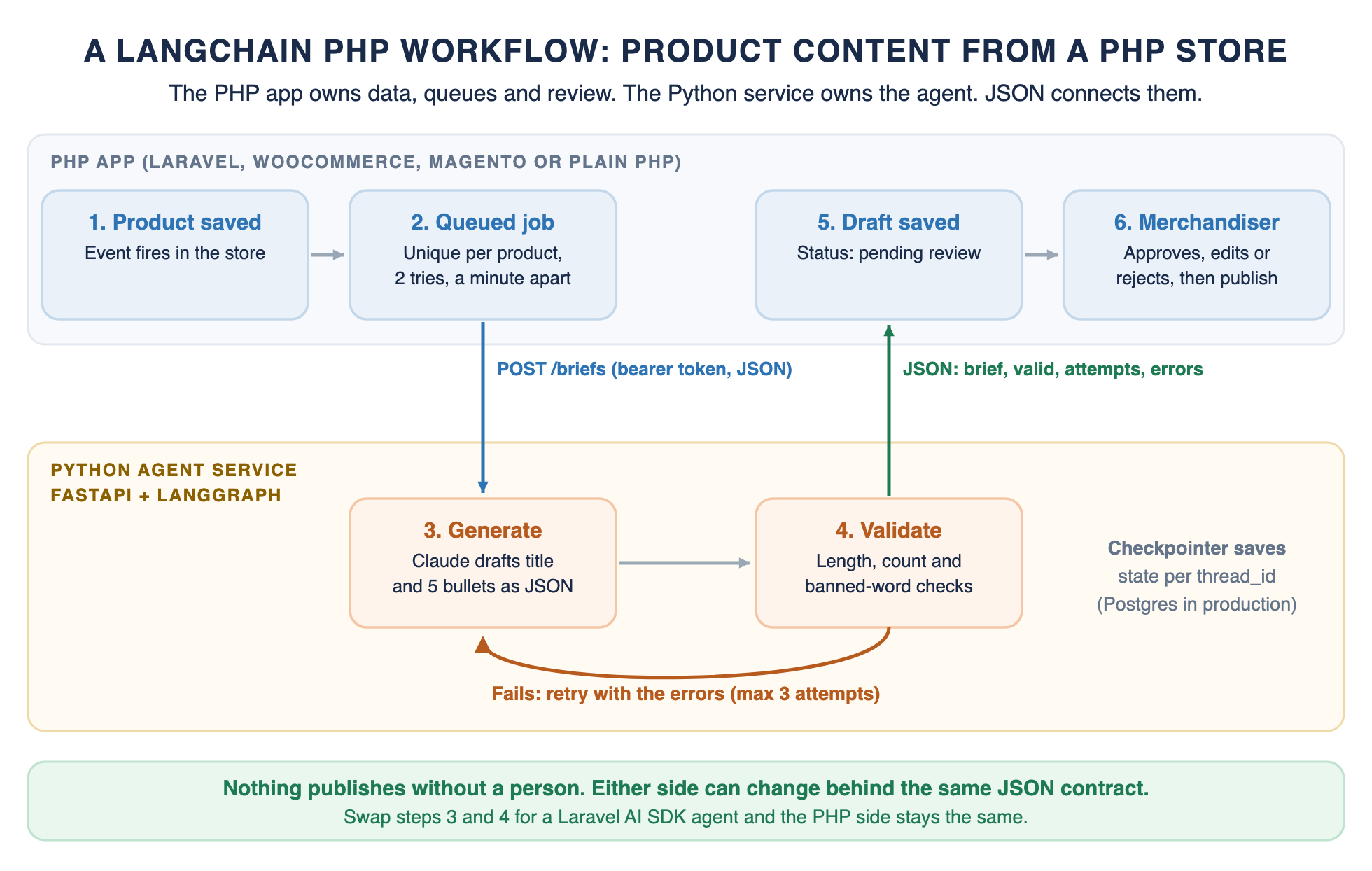
There is no official LangChain PHP library; LangChain ships for Python and JavaScript only. You can still build the same kind of AI features in a PHP app, and you do not have to rewrite anything to do it.
There are two good paths. You can use a native PHP framework, such as the Laravel AI SDK or Neuron AI. Or you can run LangChain and LangGraph in Python as a small service, and call it from PHP over HTTP.
Every example below was run on October 28, 2026, against the versions named in each section. Model replies were mocked, so the tests prove the code paths, tool loops, retries and HTTP calls, not the quality of the writing.
Our view, from building agent systems in production, is simple. For a chat feature or a simple tool-using agent, a PHP-native SDK is enough. For agents that must validate their output, retry and stay auditable, keep the agent in LangGraph and let PHP call it.
Key Takeaways
- There is no official LangChain for PHP. LangChain supports Python and JavaScript/TypeScript.
- The best-known community port, kambo-1st/langchain-php, has not been updated since June 2023.
- Native PHP options: the Laravel AI SDK, Neuron AI, LLPhant and Prism.
- The other path is a Python LangGraph service your PHP app calls with a typed JSON contract.
- Pick native PHP for simple features and a Python service for validated, multi-step agents.
- Either way, keep a person in the loop before AI output reaches customers.
What Is LangChain?
LangChain is an open-source framework for building applications and agents on top of large language models. The LangChain documentation describes create_agent, a configurable agent harness, plus integrations for models, tools and data sources. Version 1.0 shipped in October 2025, and its agents are built on LangGraph.
These are the ideas worth knowing, because every PHP option reuses them under similar names:
- Models: one interface for chat models from Anthropic, OpenAI, Google and others.
- Tools: functions the model can call, such as looking up an order or querying a database.
- Structured output: the model returns data that matches a schema, not free text.
- Memory: the conversation or task state carried between steps and turns.
- Retrieval: embeddings and vector stores, so the model can answer from your own documents.
- Agents: a model that decides which tools to call, in a loop, until the task is done.
LangGraph is the lower-level layer. The LangGraph overview calls it "a low-level orchestration framework and runtime" for long-running, stateful agents. It runs multi-step workflows as graphs, saves state at each step and supports human review.
LangSmith adds tracing, evaluation and deployment, and works with many frameworks, not only LangChain. For a deeper look at how LangChain handles retrieval, see our comparison of LlamaIndex and LangChain for RAG.
The concepts carry over to PHP almost one to one. In the Laravel AI SDK they appear as agent classes, tool classes and schemas. In Neuron AI they appear as agents, tools and workflows, and in a Python service you use LangChain's own names.
The code does not carry over, which is why the next question matters.
Is There a LangChain for PHP?
No. The langchain-ai organization on GitHub has no PHP repository, and LangChain's docs cover only Python and JavaScript. Laravel answers the same question directly in its AI SDK announcement: "Not officially. LangChain is a Python framework with no PHP port."
Three things in the PHP ecosystem look like a LangChain port and are not:
• kambo-1st/langchain-php: a community port with about 320 stars. Its repository had its last code push on June 20, 2023, before LangChain 1.0, modern tool calling and LangGraph. Building on it today means building on an abandoned API.
- langchain-laravel/langchain on Packagist: a small third-party wrapper over several model APIs, with no tagged releases. It is not made by LangChain.
- The "PHP" page in LangChain's reference: a Python parser that splits PHP source code into chunks. It reads PHP files; it does not run in PHP.
So the real LangChain PHP choice is between a native PHP framework and LangChain itself, running in Python behind an API. The next sections show both paths, with code.
PHP Alternatives to LangChain, Compared
Four PHP projects cover most of what LangChain does. The table compares them with the Python-service path on install, fit, agents, retrieval and workflow support.
The Laravel AI SDK is the default for Laravel teams. It is Laravel's own package, it covers agents, tools, structured output, streaming and conversation memory, and its AI SDK docs include testing fakes for every agent.
Neuron AI is the closest PHP match to LangGraph. Besides agents and RAG, its docs cover a workflow layer with saved checkpoints and interruptions for human approval. It works in any PHP 8.1+ app, including Symfony and WordPress.
LLPhant describes itself as a PHP generative AI framework inspired by LangChain. Its strength is retrieval: it ships integrations for 13 vector stores, from pgvector and Qdrant to Elasticsearch and Redis. Prism is a thinner Laravel package for model calls, tools and structured output across 13 providers.
LangChain PHP Code Examples: Laravel, Neuron and Python
Each example below builds the same small agent: a support assistant that looks up an order's status with a tool. That makes the three paths easy to compare. All of them use Anthropic's Claude Sonnet 5.5, and each reads the API key from the environment.
Laravel AI SDK: an Agent With a Tool
Install the package, publish its config and run its migrations. Then add your key to .env as ANTHROPIC_API_KEY.
composer require laravel/ai
php artisan vendor:publish --provider="Laravel\Ai\AiServiceProvider"
php artisan migrate
A tool is a class with a description, a schema for its inputs and a handle method. The SDK passes the model's arguments in a Request object:
<?php

namespace App\Ai\Tools;

use App\Models\Order;
use Illuminate\Contracts\JsonSchema\JsonSchema;
use Laravel\Ai\Contracts\Tool;
use Laravel\Ai\Tools\Request;

class OrderStatus implements Tool
{
    public function description(): string
    {
        return 'Look up the shipping status of an order by its ID.';
    }

    public function handle(Request $request): string
    {
        $order = Order::find($request['order_id']);

        return $order ? "Order {$order->id} is {$order->status}." : 'No order with that ID.';
    }

    public function schema(JsonSchema $schema): array
    {
        return ['order_id' => $schema->integer()->required()];
    }
}
The agent names its provider and model with attributes, gives instructions and lists its tools:
<?php

namespace App\Ai\Agents;

use App\Ai\Tools\OrderStatus;
use Laravel\Ai\Attributes\Model;
use Laravel\Ai\Attributes\Provider;
use Laravel\Ai\Contracts\Agent;
use Laravel\Ai\Contracts\HasTools;
use Laravel\Ai\Enums\Lab;
use Laravel\Ai\Promptable;

#[Provider(Lab::Anthropic)]
#[Model('claude-sonnet-5-5')]
class SupportAgent implements Agent, HasTools
{
    use Promptable;

    public function instructions(): string
    {
        return 'You are a concise support agent. Use the OrderStatus tool for order questions.';
    }

    public function tools(): iterable
    {
        return [new OrderStatus];
    }
}
use App\Ai\Agents\SupportAgent;

$response = (new SupportAgent)->prompt('Where is order 1042?');
echo $response->text; // "Order 1042 has shipped."
In our test, the SDK sent the tool schema, ran OrderStatus when the model asked for it, returned the result to the model and printed the final answer. Use this path when your app is on Laravel 12 or 13 and the feature is one agent with a few tools.
The SDK also makes agents easy to test without spending credits. Call SupportAgent::fake() in a test, run your code, then check what was sent with SupportAgent::assertPrompted(). Because the SDK uses Laravel's HTTP client, Http::fake() works too, which is how we ran the tool loop above.
Agents can return typed data instead of text. Add the HasStructuredOutput interface and a schema, and the response behaves like an array:
<?php

namespace App\Ai\Agents;

use Illuminate\Contracts\JsonSchema\JsonSchema;
use Laravel\Ai\Attributes\Model;
use Laravel\Ai\Attributes\Provider;
use Laravel\Ai\Contracts\Agent;
use Laravel\Ai\Contracts\HasStructuredOutput;
use Laravel\Ai\Enums\Lab;
use Laravel\Ai\Promptable;

#[Provider(Lab::Anthropic)]
#[Model('claude-sonnet-5-5')]
class ProductCopywriter implements Agent, HasStructuredOutput
{
    use Promptable;

    public function instructions(): string
    {
        return 'Write a product title of at most 80 characters and exactly 5 short bullets.';
    }

    public function schema(JsonSchema $schema): array
    {
        return [
            'title' => $schema->string()->required(),
            'bullets' => $schema->array()->items($schema->string())->required(),
        ];
    }
}
use App\Ai\Agents\ProductCopywriter;

$draft = (new ProductCopywriter)->prompt($product->description);
$draft['title'];   // string
$draft['bullets']; // array of strings
With Anthropic models, the SDK sends the schema through Claude's native structured output, so the reply is valid JSON that matches it. You still need your own checks for business rules, such as title length or banned claims.
Prism: a Lighter Option for Laravel
Prism builds the same request with a fluent API and no agent class. It suits one-off calls inside existing services:
use App\Models\Order;
use Prism\Prism\Enums\Provider;
use Prism\Prism\Facades\Prism;
use Prism\Prism\Facades\Tool;

$orderTool = Tool::as('order_status')
    ->for('Look up the shipping status of an order by its ID')
    ->withStringParameter('order_id', 'The order ID')
    ->using(fn (string $order_id): string => 'Order '.$order_id.' is '.(Order::find($order_id)?->status ?? 'unknown').'.');

$response = Prism::text()
    ->using(Provider::Anthropic, 'claude-sonnet-5-5')
    ->withMaxSteps(2)
    ->withTools([$orderTool])
    ->withPrompt('Where is order 1042?')
    ->asText();

echo $response->text;
Set withMaxSteps to 2 or more when you pass tools, so Prism can send the tool result back to the model.
Neuron AI: an Agent for Any PHP App
Install it with composer require neuron-core/neuron-ai. In Neuron 4, a tool is a class that declares its properties and does its work in __invoke:
<?php

use NeuronAI\Agent\Agent;
use NeuronAI\Chat\Messages\UserMessage;
use NeuronAI\Providers\AIProviderInterface;
use NeuronAI\Providers\Anthropic\Anthropic;
use NeuronAI\Tools\PropertyType;
use NeuronAI\Tools\Tool;
use NeuronAI\Tools\ToolProperty;

class OrderStatusTool extends Tool
{
    protected string $name = 'order_status';
    protected ?string $description = 'Look up the shipping status of an order by its ID.';

    protected function properties(): array
    {
        return [
            new ToolProperty(name: 'order_id', type: PropertyType::INTEGER,
                description: 'The order ID', required: true),
        ];
    }

    public function __invoke(int $order_id): string
    {
        $statuses = [1042 => 'shipped']; // replace with your database lookup

        return "Order {$order_id} is " . ($statuses[$order_id] ?? 'not found') . '.';
    }
}

class SupportAgent extends Agent
{
    protected function provider(): AIProviderInterface
    {
        return new Anthropic(key: (string) getenv('ANTHROPIC_API_KEY'), model: 'claude-sonnet-5-5');
    }

    protected function instructions(): string
    {
        return 'You are a concise support agent. Use order_status for order questions.';
    }

    protected function tools(): array
    {
        return [new OrderStatusTool()];
    }
}
$state = SupportAgent::make()->setThreadId('user-42')
    ->chat(new UserMessage('Where is order 1042?'));
echo $state->getMessage()->getContent();
The thread ID keeps the conversation history for each user. Neuron 4 returns an agent state from chat(), so read the reply with getMessage(). Older tutorials that call getContent() directly will fail on version 4.
LangGraph in Python, Called From PHP
This is the path for agents that need LangChain's full toolset. The PHP app sends a request, a Python service runs a LangGraph graph, and validated JSON comes back.
The service below writes a product brief. The graph has two nodes: generate drafts a title and five bullets, and validate checks the draft against fixed rules. If a check fails, a conditional edge sends the draft back to generate with the errors, up to three attempts.
# save the service below as app.py, then:
pip install langgraph==1.2.18 langchain==1.4.7 langchain-anthropic==1.7.6 fastapi==0.162.0 pydantic==2.14.1 uvicorn
SERVICE_TOKEN=change-me ANTHROPIC_API_KEY=your-key uvicorn app:app --port 8000
import os, secrets
from typing import TypedDict
from fastapi import Depends, FastAPI, HTTPException
from fastapi.security import HTTPAuthorizationCredentials, HTTPBearer
from pydantic import BaseModel, Field
from langchain.chat_models import init_chat_model
from langgraph.graph import StateGraph, START, END
from langgraph.checkpoint.memory import InMemorySaver

MAX_ATTEMPTS = 3
BANNED = ["revolutionary", "game-changing", "synergy", "best-in-class"]

class Brief(BaseModel):
    title: str = Field(description="Headline, at most 80 characters")
    bullets: list[str] = Field(description="Exactly 5 short bullet points")
class State(TypedDict, total=False):
    product: str
    draft: dict
    errors: list[str]
    attempts: int

writer = init_chat_model("anthropic:claude-sonnet-5-5").with_structured_output(Brief, method="json_schema")

def generate(state: State) -> dict:
    prompt = f"Write a product brief (title <= 80 chars, exactly 5 bullets) for: {state['product']}"
    if state.get("errors"):
        prompt += "\nFix these problems from your last draft:\n- " + "\n- ".join(state["errors"])
    brief = writer.invoke(prompt)
    return {"draft": brief.model_dump(), "attempts": state.get("attempts", 0) + 1}

def validate(state: State) -> dict:
    d, errors = state["draft"], []
    if len(d["title"]) > 80:
        errors.append(f"Title is {len(d['title'])} chars; max is 80.")
    if len(d["bullets"]) != 5:
        errors.append(f"Got {len(d['bullets'])} bullets; need exactly 5.")
    text = " ".join([d["title"], *d["bullets"]]).lower()
    errors += [f"Remove banned word '{w}'." for w in BANNED if w in text]
    return {"errors": errors}
def route(state: State) -> str:
    return "retry" if state["errors"] and state["attempts"] < MAX_ATTEMPTS else "done"

builder = StateGraph(State)
builder.add_node("generate", generate)
builder.add_node("validate", validate)
builder.add_edge(START, "generate")
builder.add_edge("generate", "validate")
builder.add_conditional_edges("validate", route, {"retry": "generate", "done": END})
graph = builder.compile(checkpointer=InMemorySaver())  # production: PostgresSaver

class BriefRequest(BaseModel):
    product: str = Field(min_length=3, max_length=2000)
    thread_id: str = Field(min_length=1, max_length=255)
class BriefResponse(BaseModel):
    brief: Brief
    valid: bool
    attempts: int
    errors: list[str]
app = FastAPI()
def require_token(creds: HTTPAuthorizationCredentials = Depends(HTTPBearer())) -> None:
    if not secrets.compare_digest(creds.credentials, os.environ["SERVICE_TOKEN"]):
        raise HTTPException(status_code=401, detail="Invalid token")

@app.post("/briefs", response_model=BriefResponse, dependencies=[Depends(require_token)])
def create_brief(req: BriefRequest) -> BriefResponse:
    out = graph.invoke({"product": req.product, "attempts": 0, "errors": []},
                       config={"configurable": {"thread_id": req.thread_id}})
    return BriefResponse(brief=Brief(**out["draft"]), valid=not out["errors"],
                         attempts=out["attempts"], errors=out["errors"])
A few choices in this file matter in production. The method="json_schema" argument uses Claude's native structured output, which is the reliable choice on current Claude models. The draft is stored as a plain dictionary, so saved checkpoints do not depend on the Brief class when they are loaded.
Each request resets attempts and errors, so reusing a product's thread ID never inherits an old count. For production, swap InMemorySaver for the Postgres checkpointer so state survives restarts. It comes from the langgraph-checkpoint-postgres package, and you call its setup() method once to create the tables.
On the PHP side, any HTTP client works. Here is plain PHP with Guzzle, for WordPress, Magento or Symfony apps:
<?php

use GuzzleHttp\Client;
use GuzzleHttp\Exception\BadResponseException;
use GuzzleHttp\Exception\GuzzleException;
use Psr\Http\Client\NetworkExceptionInterface;

function create_brief(string $product, string $threadId): ?array
{
    $client = new Client([
        'base_uri'        => getenv('BRIEF_SERVICE_URL'), // e.g. https://briefs.internal/
        'timeout'         => 90,
        'connect_timeout' => 5,
    ]);

    try {
        $response = $client->post('briefs', [
            'headers' => ['Authorization' => 'Bearer ' . getenv('SERVICE_TOKEN'), 'Accept' => 'application/json'],
            'json'    => ['product' => $product, 'thread_id' => $threadId],
        ]);

        return json_decode((string) $response->getBody(), true, 512, JSON_THROW_ON_ERROR);
    } catch (BadResponseException $e) {
        error_log('Brief service error: ' . $e->getResponse()->getStatusCode());
    } catch (NetworkExceptionInterface $e) {
        error_log('Brief service unreachable: ' . $e->getMessage());
    } catch (GuzzleException | JsonException $e) {
        error_log('Brief service failed: ' . $e->getMessage());
    }

    return null;
}
The first two catch blocks handle error responses and network failures on both Guzzle 7 and Guzzle 8, which changed its exception classes. The last one catches everything else, including a reply that is not valid JSON. In our test, a wrong token produced a clean 401 error instead of a crash, and a valid request returned a draft that passed on the second attempt.
A Real Workflow: Product Content Generation From a PHP Store
Here is how the pieces fit together in a real feature. A store on Laravel, WooCommerce or Magento needs a title and five bullets for every new product, written to its own rules and checked before anyone sees them.
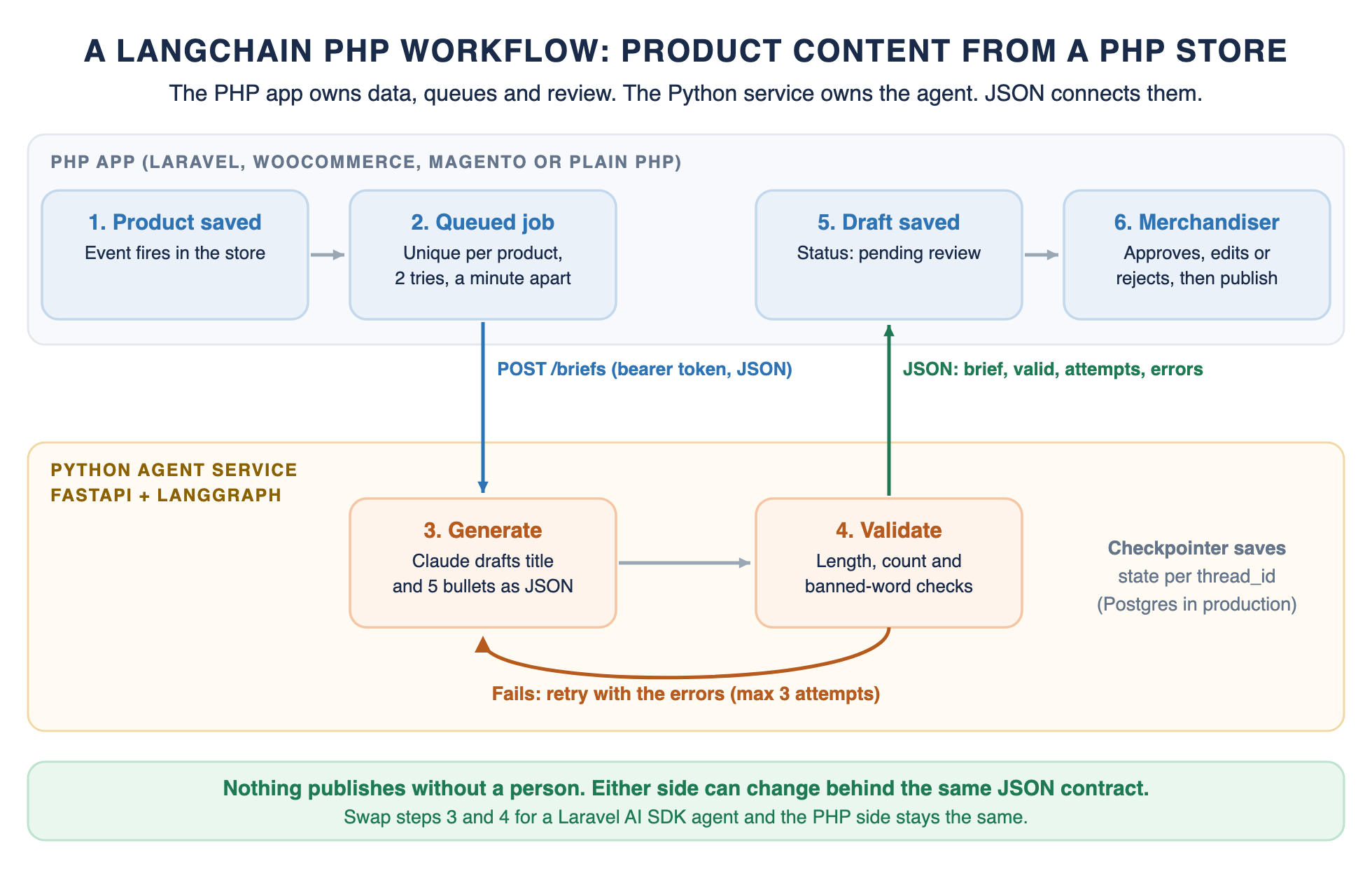
Step 1. The product is saved. A model event fires. Guard it so the job runs only for new products or a changed description; otherwise the job's own update would trigger it again.
// app/Providers/AppServiceProvider.php
use App\Jobs\GenerateProductBrief;
use App\Models\Product;

// in boot()
Product::saved(function (Product $product) {
    if ($product->wasRecentlyCreated || $product->wasChanged('description')) {
        GenerateProductBrief::dispatch($product);
    }
});
Step 2. A queued job calls the agent. The job is unique per product, gets two attempts a minute apart and logs failures. These are standard Laravel queue features:
<?php

namespace App\Jobs;

use App\Models\Product;
use App\Services\BriefClient;
use Illuminate\Contracts\Queue\ShouldBeUnique;
use Illuminate\Contracts\Queue\ShouldQueue;
use Illuminate\Foundation\Queue\Queueable;
use Illuminate\Http\Client\RequestException;
use Illuminate\Queue\Attributes\Backoff;
use Illuminate\Queue\Attributes\Tries;
use Illuminate\Queue\Attributes\UniqueFor;
use Throwable;

#[Tries(2)]
#[Backoff([60])]
#[UniqueFor(600)]
class GenerateProductBrief implements ShouldQueue, ShouldBeUnique
{
    use Queueable;

    public function __construct(public Product $product) {}

    public function uniqueId(): string
    {
        return "brief-{$this->product->id}";
    }

    public function handle(BriefClient $client): void
    {
        try {
            $result = $client->create($this->product->description, "product-{$this->product->id}");
        } catch (RequestException $e) {
            if ($e->response->clientError()) {
                $this->fail($e); // a rejected request will fail the same way again

                return;
            }
            throw $e;
        }

        $this->product->update([
            'brief' => $result['brief'],
            'brief_valid' => $result['valid'],
            'status' => 'pending_review',
        ]);
    }

    public function failed(?Throwable $e): void
    {
        report($e);
    }
}
The job uses a small client class. It retries only a 503 reply, which means the service was busy and the graph never ran, so no credits were spent. The job fails at once on a rejected request, because it would fail the same way again:
<?php

namespace App\Services;

use Illuminate\Http\Client\RequestException;
use Illuminate\Support\Facades\Http;
use Throwable;

class BriefClient
{
    public function create(string $product, string $threadId): array
    {
        return Http::baseUrl(config('services.briefs.url'))
            ->withToken(config('services.briefs.token'))
            ->acceptJson()
            ->connectTimeout(5)
            ->timeout(90)
            // Retry only "service unavailable": the graph never ran, so no credits were spent.
            ->retry(2, 1000, fn (Throwable $e) => $e instanceof RequestException
                && $e->response->status() === 503)
            ->post('/briefs', ['product' => $product, 'thread_id' => $threadId])
            ->throw()
            ->json();
    }
}
// config/services.php
'briefs' => [
    'url' => env('BRIEF_SERVICE_URL'),
    'token' => env('BRIEF_SERVICE_TOKEN'), // same value as SERVICE_TOKEN on the service
],
The products table needs three extra columns, and the model casts two of them:
// in a migration
$table->json('brief')->nullable();
$table->boolean('brief_valid')->nullable();
$table->string('status')->nullable();

// app/Models/Product.php
protected $fillable = ['description', 'brief', 'brief_valid', 'status'];
protected $casts = ['brief' => 'array', 'brief_valid' => 'boolean'];
Steps 3 and 4. The agent drafts and validates. The LangGraph service runs generate and validate, feeding each failure back into the next attempt. In our test, the first draft had six bullets and a banned word, and the retry fixed both.
Step 5. The draft is saved for review. The job stores the brief with a pending review status. The valid flag tells the reviewer whether the draft passed every rule within three attempts.
Step 6. A person approves. A merchandiser approves, edits or rejects the draft in the admin, and only approved copy is published.
The contract between the two sides is small and explicit. Keep it stable, and you can change the agent, the model or the validation rules without touching PHP.
This is the same structure, generate and validate pattern we run at enterprise scale. Our agentic e-commerce system for IPG is a LangGraph network of roughly fourteen ReAct agent nodes. Every node checks its output against Pydantic models, generated content is screened against the source data for hallucinations, and a strategist reviews every brief before anything changes.
The Native PHP Version of the Same Workflow
If you would rather stay in PHP, replace steps 3 and 4 with the ProductCopywriter agent from the Laravel example. The job calls the agent, checks the title length, bullet count and banned words in PHP, and calls the agent again with the errors if a check fails.
The rest of the workflow stays the same: the trigger, the unique job, the pending review status and the merchandiser. What you give up is LangGraph's saved state per step, its tracing in LangSmith and the option to grow the graph into several agents.
Security and Cost Checks Before Launch
- Keys stay in the environment. Model keys and the service token live in .env or a secrets manager, never in code.
- The service checks a token. The FastAPI app compares the bearer token in constant time and rejects anything else with a 401.
- Model calls are capped. The graph makes at most three model calls per run, and the job runs it at most twice, so one product costs at most six calls.
- Retries never stack. The client retries only a 503, when nothing ran, and a rejected request fails the job at once. The job's single retry covers timeouts and server errors.
- Input is treated as data. Product text goes into the prompt as content to describe, and no tool in this workflow can change store data.
- Every run is logged. Store attempts and errors with each draft, so you can spot rules or prompts that fail often.
Set the HTTP timeout to cover three model calls, since each retry adds time. A rising average attempts count is an early sign that the rules or the prompt need work.
Keep raw customer input out of tool calls that change data. If product content is the only job you need, Pumice.ai, our product data platform, runs this kind of research and generation pipeline for catalogs, with API access.
Native PHP or a Python Service? How to Choose
Start with the simplest LangChain PHP option that fits the job. Use this table as a first cut:
Then ask four questions about the feature. Does it need more than one agent, or more than a few steps? Must its output pass rules before anyone sees it?
Will a crash halfway through cost real work? Do you already have Python agents or data science code you want to reuse? If you answer yes to two or more, a Python service is likely worth the second deployment.
Native PHP wins on simplicity. You get one codebase, one deployment and one language for the team, and the Laravel AI SDK and Neuron AI cover most single-agent features well.
A Python service wins when the agent has many steps, retries or reviews. LangGraph gives you checkpoints, resumable runs and human-in-the-loop steps, and LangSmith gives you tracing and evaluation. Our WordPress chatbot builds follow the same rule and run advanced AI as an external Python API.
The cost is a second deployment and some Python skills on the team. Most guides describe the same split from another angle: LangGraph runs the agent backend as a service, and other tools handle triggers and integrations.
There is also a hybrid. Start native, and move one hard agent to Python later behind the same JSON contract. In our experience, retrieval-heavy agents are usually the first to move.
You Do Not Need to Rewrite Your PHP App
There is no LangChain PHP library, and you do not need one. For simple features, a native SDK like the Laravel AI SDK or Neuron AI gets you agents, tools and structured output in the language your team already writes.
For agents that must validate, retry and stay auditable, keep the agent in LangGraph and call it from PHP. That is the work we do: agent services behind a typed API, wired into the PHP platform you already run.
Keep Your PHP Platform. Add Agents That Hold Up.
We build LangGraph agent services and wire them into existing PHP platforms, so your app keeps its users, data and admin while the agent does the hard work behind a typed API.
• LangGraph agent services behind a typed API your PHP app calls
• Validation loops with schemas, rule checks and retries
• Queues, duplicate protection and review steps on the PHP side
• From the team behind a LangGraph system of roughly fourteen agents in production
Frequently Asked Questions
Is there an official LangChain for PHP?
No. LangChain is officially available for Python and JavaScript/TypeScript only. PHP teams use a native framework such as the Laravel AI SDK or Neuron AI, or call a Python LangChain or LangGraph service over HTTP.
Can I use LangChain with Laravel?
Not directly, but you can get the same features. The Laravel AI SDK covers agents, tools, structured output and memory natively, and a Laravel job can call a Python LangGraph service when you need more.
What is the best LangChain alternative for PHP?
For Laravel apps, the Laravel AI SDK. For other PHP frameworks, or when you need workflows with checkpoints and approvals, Neuron AI is the closest match to LangChain and LangGraph.
Can PHP call a LangGraph agent?
Yes. Wrap the graph in a small FastAPI service, protect it with a token, and call it from PHP with Laravel's HTTP client or Guzzle using a typed JSON contract.
Does LangChain support PHP code as input?
Yes, as data. LangChain's Python packages include a parser (in langchain-community) and a text splitter for PHP source files, which helps when you build retrieval over a PHP codebase. It does not run inside PHP.