
LangGraph PHP: Your Options, Code and a Real Workflow
There is no official LangGraph for PHP. Build stateful AI workflows with Neuron or LaraGraph.
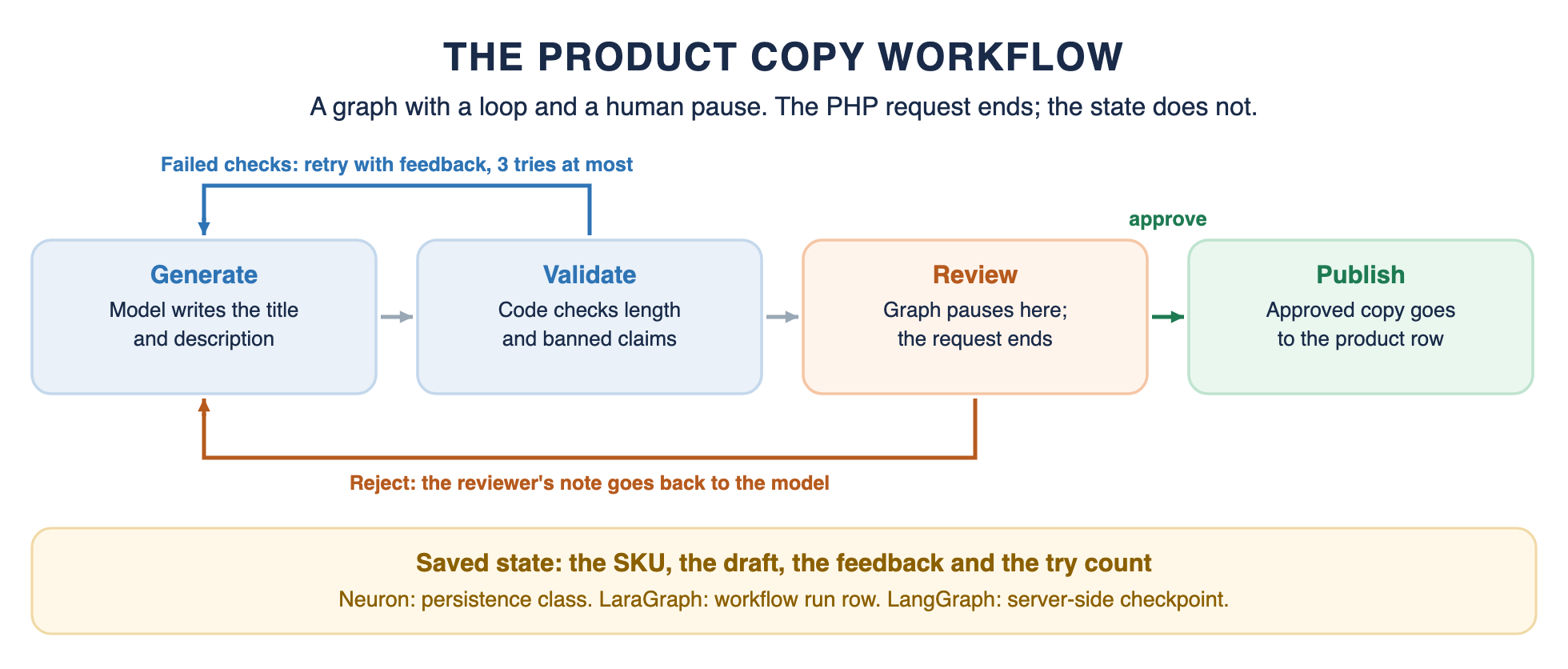
There is no official LangGraph for PHP. LangGraph ships for Python and JavaScript, yet PHP teams can still build the same stateful AI workflows, with loops, saved state and human approval.
A LangGraph PHP project usually hits one wall first. A PHP request ends in moments, and a workflow may need to wait two days for a merchandiser to approve its output. Nothing in memory survives that wait.
So the design question is where the state goes. Three working paths answer it, each with code we ran on fake models. A full build follows: product copy with a validation loop and a human approval step. If a workflow outgrows PHP later, the graph can move behind an API while your app stays in PHP.
Key Takeaways
- LangGraph itself runs on Python and JavaScript, and the langgraph/langgraph-php package is unofficial.
- Neuron AI, whose package includes Workflow, is the most widely installed PHP option, with about 1.47M Packagist installs.
- LaraGraph is the closest match to LangGraph's model in Laravel, but it is a very young package.
- PHP can call a real LangGraph server over REST, with three API calls.
- Every option saves state outside the request, so design for pause and resume from the start.
What Is LangGraph?
LangGraph is a framework from the LangChain team for building long-running, stateful agent workflows as graphs. You define nodes that do work, edges that decide what runs next, and a shared state that every node can read and update. Unlike a simple chain, a graph can loop.
LangChain is the higher-level framework for building LLM apps and agents, and its agents are built on LangGraph. You reach for LangGraph itself when you need control over the flow. In our comparison of n8n and LangGraph for production workflows, it plays the role of the agent backend that other systems call.
Three features separate LangGraph from a plain agent loop:
- Cycles: a node can send work back to an earlier node, which is how retry and validation loops work.
- Checkpoints: state is saved at each step, so a run can stop and continue later.
- Human approval: a node can pause the graph and wait for a person's answer.
Those are the features to look for in PHP. Package names matter far less than whether a tool has all three.
Is There a LangGraph for PHP?
The name is a trap here. A package called langgraph/langgraph-php exists, but it comes from an individual developer, not the LangChain team. It has 40 total installs and a single tagged release from September 2025, so we would not build on it.
Three other paths are worth your time:
Neuron AI leads by a wide margin on adoption. Its Workflow component has loops, branches, interrupts and pluggable persistence, and it runs in any PHP 8.1+ app. LaraGraph says it is inspired by LangGraph, and its vocabulary shows it, but v0.3.0 dates from April 2026 and 20 installs means you would be an early adopter. One smaller Laravel option, heiner/agent-graph, has about 860 installs and needs laravel/ai.
Why PHP Changes the Design of a Stateful Workflow
A Python LangGraph service is a long-running process. Classic PHP is not: each request builds its objects, responds and throws everything away. A workflow that waits for a person cannot live in a variable, because the variable is gone when the response is sent.
So every option here does the same three things. It saves the state outside the process, it ends the request at the pause, and it rebuilds the run from storage when the answer arrives. The difference is where that happens:
- Neuron Workflow: a persistence class stores the run, and a later request rebuilds the workflow with the same ID.
- LaraGraph: a database row holds the state, and each node runs as a queue job.
- LangGraph server: the Python server keeps checkpoints per thread, and PHP only holds the thread ID.
Two rules follow from this design. State must be data that can be saved, so never put a PDO connection or an API client in it. And in Neuron and LangGraph, a node restarts from the top when it resumes, so anything before the pause runs twice.
Keep emails, payments and other side effects after the pause or in a later node. LaraGraph's interruptBefore avoids the problem, since it pauses before the node starts.
LangGraph-Style Workflows in PHP: Code Examples
All three examples below build the same loop and pause, so you can compare them directly. The Neuron version is the complete one. The table maps LangGraph's concepts onto each PHP engine:
Neuron Workflow: Nodes, a Loop and an Interrupt
We ran this on PHP 8.5 with Neuron AI 4.1.17. Neuron's hosted docs lag the current code, so check that any example you copy is written for version 4. Install it with Composer:
composer require neuron-core/neuron-aiNeuron has no separate edge list. A node's return type is its edge: whichever event it returns decides which node runs next. Keep the events in one file, and add it to your Composer autoload so PHP can find them. Run composer dump-autoload after you do:
<?php

declare(strict_types=1);

namespace App;

use NeuronAI\Workflow\Events\Event;

// Events carry the graph's edges: what a node returns decides which node runs next.
class DraftNeeded implements Event {}
class DraftReady implements Event {}
class ReadyForReview implements Event {}
class CopyApproved implements Event {}
"autoload": {
    "psr-4": { "App\\": "src/" },
    "classmap": ["src/Events.php"]
}
Validation is where the loop lives. This node returns DraftNeeded to go back to the model, or ReadyForReview to move on. Plain PHP makes the decision, so the model cannot talk its way past a check:
<?php

declare(strict_types=1);

namespace App\Nodes;

use App\DraftReady;
use App\ReadyForReview;
use App\DraftNeeded;
use NeuronAI\Workflow\Node;
use NeuronAI\Workflow\WorkflowState;

class ValidateCopy extends Node
{
    private const MAX_TRIES = 3;

    public function __invoke(DraftReady $event, WorkflowState $state): DraftNeeded|ReadyForReview
    {
        $issues = [];
        if (mb_strlen($state->get('title')) > 80) {
            $issues[] = 'The title is over 80 characters.';
        }
        if (preg_match('/\b(best|guaranteed)\b/i', $state->get('description'))) {
            $issues[] = 'Remove the words best and guaranteed.';
        }
        $state->set('feedback', $issues);

        // Out of tries? Stop looping and show a person what failed.
        return $issues !== [] && $state->get('tries') < self::MAX_TRIES
            ? new DraftNeeded()
            : new ReadyForReview();
    }
}
The pause is one call. interrupt() saves the run and stops the workflow, so run() returns and your script can respond. The same call hands back the reviewer's answer when the run resumes. In our test, the code after it ran only after a person had answered:
<?php

declare(strict_types=1);

namespace App\Nodes;

use App\CopyApproved;
use App\ReadyForReview;
use App\DraftNeeded;
use NeuronAI\Agent\Interrupt\Action;
use NeuronAI\Agent\Interrupt\ApprovalRequest;
use NeuronAI\Workflow\Node;
use NeuronAI\Workflow\WorkflowState;

class ReviewCopy extends Node
{
    public function __invoke(ReadyForReview $event, WorkflowState $state): CopyApproved|DraftNeeded
    {
        $answer = $this->interrupt(new ApprovalRequest(
            message: 'Approve this copy? Open issues: ' . (implode(' ', $state->get('feedback')) ?: 'none'),
            actions: [new Action(id: 'copy', name: $state->get('title'), description: $state->get('description'))],
        ));

        // Code below runs only after a person answers, possibly days later.
        if ($answer['copy'] === 'approve') {
            return new CopyApproved();
        }

        $state->set('note', $answer['copy'][1] ?: 'Rejected by the reviewer.');
        $state->set('tries', 0);

        return new DraftNeeded();
    }
}
The workflow class lists the nodes and says where state goes. Services belong in resources(), which is rebuilt for every request and never saved with the state:
<?php

declare(strict_types=1);

namespace App;

use App\Nodes\GenerateCopy;
use App\Nodes\PublishCopy;
use App\Nodes\ReviewCopy;
use App\Nodes\ValidateCopy;
use NeuronAI\Workflow\Events\Event;
use NeuronAI\Workflow\Persistence\FilePersistence;
use NeuronAI\Workflow\Persistence\PersistenceInterface;
use NeuronAI\Workflow\Workflow;
use NeuronAI\Workflow\WorkflowResources;
use PDO;

class CopyWorkflow extends Workflow
{
    // The first event: the graph starts at the node that accepts it.
    protected function startEvent(): Event
    {
        return new DraftNeeded();
    }

    protected function nodes(): array
    {
        return [new GenerateCopy(), new ValidateCopy(), new ReviewCopy(), new PublishCopy()];
    }

    // State goes here between requests. Files suit one process at a time; PHP-FPM needs DatabasePersistence.
    protected function persistence(): PersistenceInterface
    {
        return new FilePersistence(getenv('WORKFLOW_STORAGE'));
    }

    // Services are rebuilt for every request and never saved with the state.
    protected function resources(): WorkflowResources
    {
        return new WorkflowResources([
            'writer' => CopyWriter::make(),
            'db'     => new PDO(getenv('DB_DSN'), getenv('DB_USER') ?: null, getenv('DB_PASSWORD') ?: null),
        ]);
    }
}
One detail tripped us up. A Neuron node accepts a single event type, so a union like StartEvent|DraftNeeded fails validation. The startEvent() method solves that: the first draft and every rewrite both arrive as DraftNeeded.
LaraGraph: The Same Graph in Laravel
LaraGraph reads most like LangGraph. It needs PHP 8.4 and a Laravel app, and the package name on Packagist is cainydev/laragraph. We ran this on Laravel 13 with LaraGraph v0.3.0:
composer require cainydev/laragraph
php artisan vendor:publish --tag="laragraph-migrations"
php artisan migrate
<?php

namespace App\Workflows;

use App\Workflows\Nodes\GenerateCopy;
use App\Workflows\Nodes\PublishCopy;
use App\Workflows\Nodes\ReviewCopy;
use App\Workflows\Nodes\ValidateCopy;
use Cainy\Laragraph\Builder\Workflow;
use Cainy\Laragraph\Reducers\OverwriteReducer;

class CopyPipeline extends Workflow
{
    public function definition(): void
    {
        // The default reducer appends lists, so an empty issues list would not clear old issues.
        $this->withReducer(OverwriteReducer::class)
            ->addNode('generate', GenerateCopy::class)
            ->addNode('validate', ValidateCopy::class)
            ->addNode('review', ReviewCopy::class)
            ->addNode('publish', PublishCopy::class)
            ->transition(Workflow::START, 'generate')
            ->transition('generate', 'validate')
            ->transition('validate', 'generate', fn (array $s) => $s['issues'] !== [] && $s['tries'] < 3)
            ->transition('validate', 'review', fn (array $s) => $s['issues'] === [] || $s['tries'] >= 3)
            ->transition('review', 'publish', fn (array $s) => $s['approved'] ?? false)
            ->transition('review', 'generate', fn (array $s) => ! ($s['approved'] ?? false))
            ->transition('publish', Workflow::END)
            ->interruptBefore('review');
    }
}
Each node is a small class that returns only the state it changes. The generate node calls the model through Prism, which LaraGraph installs as a dependency and which reads your ANTHROPIC_API_KEY:
<?php

namespace App\Workflows\Nodes;

use Cainy\Laragraph\Contracts\Node;
use Cainy\Laragraph\Engine\NodeExecutionContext;
use Prism\Prism\Facades\Prism;

class GenerateCopy implements Node
{
    public function handle(NodeExecutionContext $context, array $state): array
    {
        $feedback = implode(' ', [...($state['issues'] ?? []), $state['note'] ?? '']);

        $title = Prism::text()
            ->using('anthropic', 'claude-sonnet-5-5')
            ->withPrompt("Write a product title from: {$state['product']}. Fix these issues: {$feedback}")
            ->asText()
            ->text;

        return ['title' => $title, 'tries' => ($state['tries'] ?? 0) + 1];
    }
}
The other three nodes are shorter. Validation returns its issues, the review node resets the try count on a rejection, and the publish node writes to a Product model with sku and title columns. This version checks only the title, to keep it short:
<?php

namespace App\Workflows\Nodes;

use Cainy\Laragraph\Contracts\Node;
use Cainy\Laragraph\Engine\NodeExecutionContext;

class ValidateCopy implements Node
{
    public function handle(NodeExecutionContext $context, array $state): array
    {
        return ['issues' => mb_strlen($state['title']) > 80 ? ['The title is over 80 characters.'] : []];
    }
}
<?php

namespace App\Workflows\Nodes;

use Cainy\Laragraph\Contracts\Node;
use Cainy\Laragraph\Engine\NodeExecutionContext;

// The run pauses before this node. A rejection sends the reviewer's note back to generate.
class ReviewCopy implements Node
{
    public function handle(NodeExecutionContext $context, array $state): array
    {
        return ($state['approved'] ?? false) ? [] : ['tries' => 0];
    }
}
<?php

namespace App\Workflows\Nodes;

use App\Models\Product;
use Cainy\Laragraph\Contracts\Node;
use Cainy\Laragraph\Engine\NodeExecutionContext;

class PublishCopy implements Node
{
    public function handle(NodeExecutionContext $context, array $state): array
    {
        Product::where('sku', $state['sku'])->update(['title' => $state['title']]);

        return ['published' => true];
    }
}
Start a run from a controller or a job, and resume it when the reviewer decides. Whatever you pass to resume() is merged into the state:
use App\Workflows\CopyPipeline;
use Cainy\Laragraph\Facades\Laragraph;

$run = Laragraph::run(CopyPipeline::class, ['sku' => 'A-100', 'product' => 'Acme desk lamp']);

// Later, after a person decides:
Laragraph::resume($run->id, ['approved' => true]);
Laragraph::resume($run->id, ['approved' => false, 'note' => 'Mention the dimmer.']);
Our test turned up three things to plan for:
- Reducers: the default reducer appends lists, so returning an empty issues list did not clear old issues, and the graph kept looping. Setting OverwriteReducer fixed it.
- Workers: every node is a queue job. With no worker running, a run sits in the running status and nothing tells you why, so run php artisan queue:work on a real queue.
- Timeouts: node_timeout defaults to 60 seconds. If model calls can run longer, run php artisan vendor:publish --tag="laragraph-config", raise it, and keep your queue's retry_after above it.
Calling Real LangGraph From PHP
The third path keeps the graph in Python and treats it as a service. You get real LangGraph, and PHP only needs an HTTP client. The Agent Server's human-in-the-loop API takes three calls: create a thread, start a run, and resume it.
Here is the same loop and pause in Python. It has no publish node: PHP writes to the catalog once published is true. Replace write_copy with your model call. The interrupt() call works as it does in Neuron:
from typing import TypedDict

from langgraph.graph import END, START, StateGraph
from langgraph.types import interrupt


class CopyState(TypedDict, total=False):
    sku: str
    product: str
    title: str
    description: str
    feedback: list[str]
    note: str
    tries: int
    published: bool


def write_copy(product: str, feedback: list[str]) -> dict:
    # Replace with your model call. Returns {"title": ..., "description": ...}.
    title = "Acme Desk Lamp" if feedback else "Acme Desk Lamp " + "x" * 80
    return {"title": title, "description": "A dimmable desk lamp."}


def generate(state: CopyState) -> dict:
    notes = state.get("feedback", []) + [state.get("note", "")]
    copy = write_copy(state["product"], [n for n in notes if n])
    return {**copy, "tries": state.get("tries", 0) + 1}


def validate(state: CopyState) -> dict:
    issues = ["The title is over 80 characters."] if len(state["title"]) > 80 else []
    return {"feedback": issues}


def after_validate(state: CopyState) -> str:
    return "generate" if state["feedback"] and state["tries"] < 3 else "review"


def review(state: CopyState) -> dict:
    answer = interrupt({"title": state["title"], "issues": state["feedback"]})
    if answer["decision"] == "approve":
        return {"published": True}
    return {"note": answer["note"], "tries": 0}


def after_review(state: CopyState) -> str:
    return END if state.get("published") else "generate"


builder = StateGraph(CopyState)
builder.add_node(generate)
builder.add_node(validate)
builder.add_node(review)
builder.add_edge(START, "generate")
builder.add_edge("generate", "validate")
builder.add_conditional_edges("validate", after_validate, ["generate", "review"])
builder.add_conditional_edges("review", after_review, ["generate", END])
graph = builder.compile()
{
  "dependencies": ["."],
  "graphs": { "copy": "./copy_graph.py:graph" }
}
Start a local server with the LangGraph CLI. It listens on port 2024:
pip install -U langgraph "langgraph-cli[inmem]"
langgraph dev --no-browser
The PHP side is a small cURL client, with no framework and no LangGraph library:
<?php

declare(strict_types=1);

final class LangGraphClient
{
    public function __construct(private string $base, private string $apiKey = '') {}

    public function createThread(): string
    {
        return $this->post('/threads', new stdClass())['thread_id'];
    }

    // runs/wait blocks until the graph finishes or pauses, then returns its state.
    public function run(string $threadId, string $graph, array $input): array
    {
        return $this->post("/threads/{$threadId}/runs/wait", ['assistant_id' => $graph, 'input' => $input]);
    }

    public function resume(string $threadId, string $graph, array $answer): array
    {
        return $this->post("/threads/{$threadId}/runs/wait", [
            'assistant_id' => $graph,
            'command'      => ['resume' => $answer],
        ]);
    }

    private function post(string $path, array|object $body): array
    {
        $ch = curl_init($this->base . $path);
        curl_setopt_array($ch, [
            CURLOPT_POST           => true,
            CURLOPT_RETURNTRANSFER => true,
            CURLOPT_TIMEOUT        => 180,
            CURLOPT_HTTPHEADER     => ['Content-Type: application/json', "X-Api-Key: {$this->apiKey}"],
            CURLOPT_POSTFIELDS     => json_encode($body, JSON_THROW_ON_ERROR),
        ]);

        $raw    = curl_exec($ch);
        $status = (int) curl_getinfo($ch, CURLINFO_RESPONSE_CODE);

        if ($status !== 200 || ! is_string($raw)) {
            throw new RuntimeException("$path failed with status $status: " . substr((string) $raw, 0, 200));
        }

        return json_decode($raw, true, 512, JSON_THROW_ON_ERROR);
    }
}
When a graph pauses, the response from runs/wait carries an __interrupt__ key next to your state. Store the thread ID with the SKU, since that ID is the only thing PHP has to remember. We ran this flow against a real langgraph dev server with LangGraph 1.2.19, and LangGraph's interrupt docs cover the Python side.
<?php

declare(strict_types=1);

require __DIR__ . '/LangGraphClient.php';

$client = new LangGraphClient(getenv('LANGGRAPH_URL'), (string) getenv('LANGGRAPH_API_KEY'));

$thread = $client->createThread();   // save this ID with the SKU
$state  = $client->run($thread, 'copy', ['sku' => 'A-100', 'product' => 'Acme desk lamp']);

if (isset($state['__interrupt__'])) {
    echo "Paused for review: {$state['title']}\n";
}

// Later, in another request, after a person decides:
$state = $client->resume($thread, 'copy', ['decision' => 'reject', 'note' => 'Mention the dimmer.']);
echo isset($state['__interrupt__']) ? "Paused again after {$state['tries']} try\n" : "Finished\n";

$state = $client->resume($thread, 'copy', ['decision' => 'approve']);
echo ($state['published'] ?? false) ? "Published {$state['sku']}\n" : "Not published\n";
langgraph dev is for development only. A production Agent Server runs on LangSmith Cloud, or self-hosted on an Enterprise plan with a license key. LangSmith deployments check an API key in the X-Api-Key header, which the client already sends, while a self-hosted server needs custom auth or a private network. The dev server does not check keys, so test auth on a real deployment.
A Real Workflow: Product Copy With a Validation Loop and Human Approval
Here is a job worth a graph. A store needs new titles and descriptions for its products. A model writes them, code checks them, and a merchandiser approves them before anything goes live. The review might happen days later.
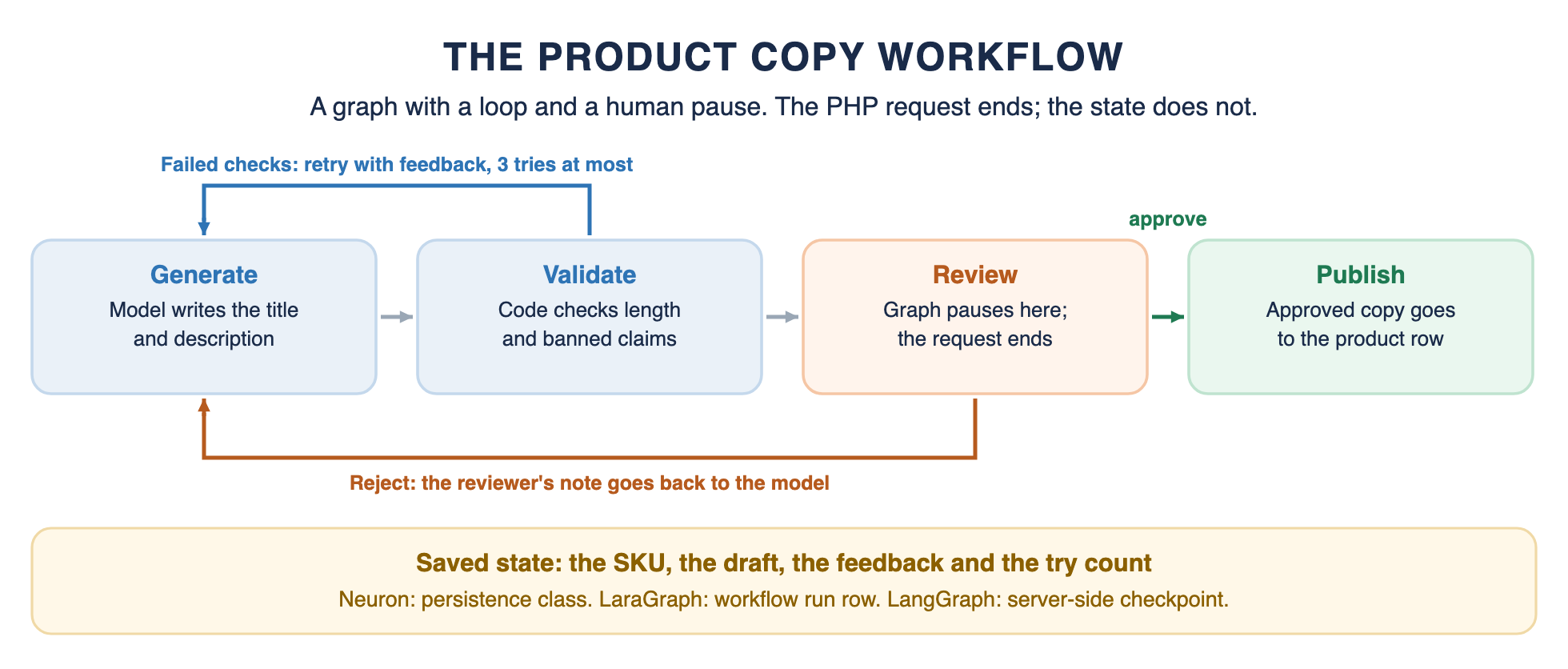
This loop is a smaller version of what we built at enterprise scale. The agentic system we built for IPG, at the time a Fortune 400 holding company and now part of Omnicom, uses LangGraph with a structure, generate and validate loop, and strategists review the output. The pattern carries over to any engine.
The Neuron code above covers validation and review. Three pieces finish the build, starting with the writer. It is an ordinary Neuron agent, and ProductCopy tells it to return a typed object:
<?php

declare(strict_types=1);

namespace App;

use NeuronAI\StructuredOutput\SchemaProperty;

class ProductCopy
{
    #[SchemaProperty(description: 'The product title', required: true)]
    public string $title;

    #[SchemaProperty(description: 'The product description', required: true)]
    public string $description;
}
<?php

declare(strict_types=1);

namespace App;

use NeuronAI\Agent\Agent;
use NeuronAI\Agent\SystemPrompt;
use NeuronAI\Providers\AIProviderInterface;
use NeuronAI\Providers\Anthropic\Anthropic;

class CopyWriter extends Agent
{
    protected function provider(): AIProviderInterface
    {
        return new Anthropic(key: getenv('ANTHROPIC_API_KEY'), model: 'claude-sonnet-5-5');
    }

    protected function instructions(): string
    {
        return (string) new SystemPrompt(
            background: ['You write ecommerce product copy from the product data you are given.'],
            steps: ['Use only facts from the product data.', 'Fix every issue listed under Feedback.'],
        );
    }
}
The generate node reads the feedback from state and adds it to the prompt. Each try gets its own thread, so the model sees the latest feedback and not a growing argument with itself:
<?php

declare(strict_types=1);

namespace App\Nodes;

use App\DraftReady;
use App\ProductCopy;
use App\DraftNeeded;
use NeuronAI\Chat\Messages\UserMessage;
use NeuronAI\Workflow\Node;
use NeuronAI\Workflow\WorkflowResources;
use NeuronAI\Workflow\WorkflowState;

class GenerateCopy extends Node
{
    public function __invoke(DraftNeeded $event, WorkflowState $state, WorkflowResources $resources): DraftReady
    {
        $tries  = $state->get('tries', 0) + 1;
        $notes  = implode(' ', [...$state->get('feedback', []), $state->get('note', '')]);
        $prompt = "Product data: {$state->get('product')}\n\nFeedback: {$notes}";

        // Each try gets its own thread, so the model only sees the current feedback.
        $copy = $resources->get('writer')
            ->for("{$state->getWorkflowId()}-{$state->getRunId()}-{$tries}")
            ->structured(new UserMessage($prompt), ProductCopy::class, maxRetries: 1);

        $state->set('title', $copy->title);
        $state->set('description', $copy->description);
        $state->set('tries', $tries);

        return new DraftReady();
    }
}
The publish node is the only one that writes to your catalog, and it runs only after approval:
<?php

declare(strict_types=1);

namespace App\Nodes;

use App\CopyApproved;
use NeuronAI\Workflow\Events\StopEvent;
use NeuronAI\Workflow\Node;
use NeuronAI\Workflow\WorkflowResources;
use NeuronAI\Workflow\WorkflowState;

class PublishCopy extends Node
{
    public function __invoke(CopyApproved $event, WorkflowState $state, WorkflowResources $resources): StopEvent
    {
        $resources->get('db')
            ->prepare('UPDATE products SET title = ?, description = ? WHERE sku = ?')
            ->execute([$state->get('title'), $state->get('description'), $state->get('sku')]);

        return new StopEvent();
    }
}
Two thin endpoints run the graph. start.php starts a run and returns the review request once the graph pauses, and the workflow ID ties everything to the SKU:
<?php

declare(strict_types=1);

require __DIR__ . '/../vendor/autoload.php';

use App\CopyWorkflow;
use NeuronAI\Exceptions\RunInFlightException;
use NeuronAI\Workflow\WorkflowState;

header('Content-Type: application/json');

$sku     = $_POST['sku'] ?? '';
$product = $_POST['product'] ?? '';
if (! preg_match('/^[\w-]+$/', $sku) || $product === '') {
    http_response_code(422);
    exit(json_encode(['error' => 'Send a sku and product data.']));
}

try {
    $state = CopyWorkflow::make("copy-{$sku}", new WorkflowState(['sku' => $sku, 'product' => $product]))
        ->setMaxSteps(200)
        ->run();
} catch (RunInFlightException) {
    http_response_code(409);   // this SKU is already waiting for a reviewer
    exit(json_encode(['error' => 'A run for this SKU is already open.']));
}

echo json_encode(['paused' => $state->isInterrupted(), 'review' => $state->getInterruptRequest()]);
review.php rebuilds the workflow from that ID and delivers the reviewer's decision. Put both endpoints behind your staff login with CSRF protection, because anyone who can reach them can spend model calls or publish copy:
<?php

declare(strict_types=1);

require __DIR__ . '/../vendor/autoload.php';

use App\CopyWorkflow;
use NeuronAI\Exceptions\InputTranslationException;
use NeuronAI\Exceptions\WorkflowRefusedException;

header('Content-Type: application/json');

// A rejection sends the copy back with the note. Anything else is refused, so a bad request cannot publish.
$sku    = $_POST['sku'] ?? '';
$answer = match ($_POST['decision'] ?? '') {
    'approve' => 'approve',
    'reject'  => ['reject', (string) ($_POST['note'] ?? '')],
    default   => null,
};
if ($answer === null) {
    http_response_code(422);
    exit(json_encode(['error' => 'Send decision=approve or decision=reject.']));
}

try {
    $state = CopyWorkflow::make("copy-{$sku}")
        ->setMaxSteps(200)   // counts replayed steps too, so leave room for several rejections
        ->submitInputs(['copy' => $answer])
        ->run();
} catch (InputTranslationException | WorkflowRefusedException) {
    http_response_code(409);   // nothing is waiting: a second click, or an unknown SKU
    exit(json_encode(['error' => 'No review is open for this SKU.']));
}

echo json_encode(['paused' => $state->isInterrupted(), 'review' => $state->getInterruptRequest()]);
The workflow reads its settings from environment variables. Set them in your server or FPM pool, or load them with a .env library. Point WORKFLOW_STORAGE at a folder that exists and sits outside your web root:
ANTHROPIC_API_KEY=your-anthropic-key
WORKFLOW_STORAGE=/var/app/storage/workflows
DB_DSN=mysql:host=127.0.0.1;
dbname=shop
DB_USER=shopDB_PASSWORD=change-me
We ran the whole graph with Neuron's fake AI provider, so these results prove the flow and not the quality of the model's writing. The endpoints ran over HTTP in separate requests, with a test double in place of the writer:
The file store suits one process at a time, which rules out a normal PHP-FPM pool. Neuron also ships database, Eloquent and Redis persistence, and DatabasePersistence needs a workflow_store table, with the SQL in the class's docblock. Step budgets count replayed steps as well, so we set 200 to leave room for several rejections. Treat the three-try cap as a budget too, since each loop is another model call.
On a LangGraph server, the graph stays the same shape, and only the PHP gets smaller. start.php calls run() and saves the thread ID, while review.php calls resume(). The validation code moves to Python, and PHP keeps the catalog and the staff screen.
Which LangGraph PHP Option Should You Use?
Pick by where your team and your agents already live:
- Use Neuron Workflow for most PHP apps. It works with or without a framework, it has the widest use among PHP options, and it covers loops, interrupts and persistence.
- Use LaraGraph if you are on Laravel and PHP 8.4, you already run queue workers, and you accept the risk of a very young package.
- Use a LangGraph server if you already have Python agents, need LangSmith tracing and evaluations, or run many agents that share one platform.
The choice is not permanent if you plan for it. Keep your workflow's input and output as plain JSON from day one, and put your PHP code behind one small class. To move this build to a LangGraph server, you would rewrite the nodes in Python. On the PHP side, only the engine calls in the two endpoints change, because the state is already plain data.
Run all of this on a patched PHP. October's PHP2Shell fixes shipped in 8.5.12, 8.4.27, 8.3.36 and 8.2.35, so take the newest release in your branch. PHP 8.1 has no official fixed release, so move to 8.2 or later.
Design Your LangGraph PHP Workflow for Persistence First
LangGraph PHP has a short answer: no official port, and three good paths. You do not need to leave PHP to get loops, saved state and human approval, but you do need to decide where state lives before you write the first node.
Start with Neuron Workflow unless you have a clear reason not to. When a workflow outgrows it, the graph can move to LangGraph behind an API and your app stays where it is. We build both sides of that line.
Need Stateful AI Workflows in Your PHP Platform?
We build stateful AI agents with validation loops, human approval and durable state, in a PHP engine or behind a LangGraph service your app calls.
• Workflows that survive restarts and wait days for approval
• Validation loops that catch bad output before a person sees it
• PHP-native engines, or LangGraph behind an API
• A migration path when a workflow outgrows its first home
Frequently Asked Questions
Is there a LangGraph for PHP?
No, there is no official LangGraph for PHP. LangGraph ships for Python and JavaScript. Neuron Workflow and LaraGraph offer the same kind of stateful graphs in PHP, and PHP can also call a real LangGraph server.
Can PHP call a LangGraph agent?
Yes, PHP can call a LangGraph agent over the Agent Server's REST API. Create a thread, post to runs/wait, and resume with a command when the graph pauses. Any HTTP client works, including plain cURL.
Does LaraGraph work outside Laravel?
No, LaraGraph is a Laravel package. It relies on Laravel's queue, database and service container. For plain PHP or Symfony, use Neuron Workflow, which has no framework requirement.
Is there a LangGraph PHP example on GitHub?
Yes, but check who wrote it and when. Small ports exist, such as langgraph/langgraph-php, and some date from 2025. Our examples ran on November 1, 2026, with fake models, against Neuron AI 4.1.17, LaraGraph v0.3.0 and LangGraph 1.2.19.