
PHP AI Chatbot: How to Build One Step by Step (With Code)
Build an AI chatbot in PHP step by step: the Anthropic or OpenAI PHP SDK, streaming, memory, answers
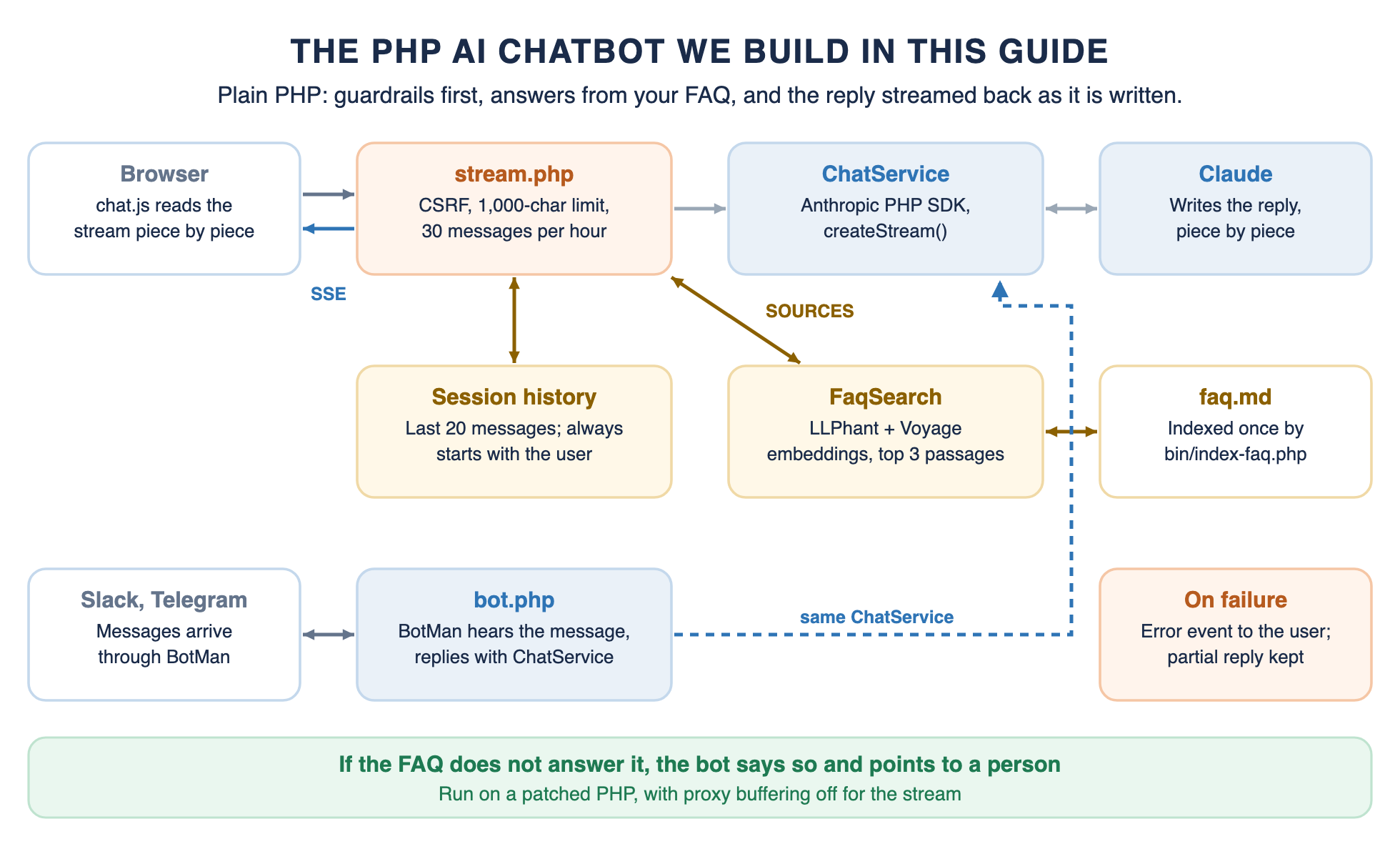
A PHP AI chatbot needs three things: a PHP library that talks to a language model, an endpoint your page can call, and a way to show the reply as it arrives. You can have that working in an afternoon.
Then a customer asks whether you ship to Australia, and the bot says yes, because nothing told it you ship only to the US, Canada and the UK. A chatbot customers can rely on answers from your own content, says when it does not know, hands off to a person, and does not leak data or run up a bill.
You will use Anthropic's official PHP SDK for the model, with the openai-php/client version alongside, LLPhant to answer from your FAQ, and plain JavaScript for the chat window. Then you will see the same chatbot in Laravel, Symfony and WordPress, and on Slack with BotMan.
Every code block was run on October 29, 2026, on PHP 8.5, against the library versions in the table below. Model calls went to a local copy of the APIs, so the tests prove the code paths, streaming and error handling, not the quality of the answers.
Key Takeaways
- Anthropic's official PHP SDK and openai-php/client both stream replies, and either fits the same small chat service class.
- Send the system prompt with every request, and keep the history trimmed so it always starts with a user message.
- Stream with server-sent events, keep the session open until the reply is saved, and buffer partial events in the browser.
- Answer from your own FAQ with LLPhant, and tell the model to say "I don't know" when the FAQ has no answer.
- CSRF tokens, input limits and rate limits belong in the first version, not the second.
- Run a patched PHP: the October 2026 PHP2Shell flaws target exactly this kind of public endpoint.
How a PHP AI Chatbot Works
The model does the writing; your PHP code decides what it sees and what the user gets back. Our guide to building a chatbot with LLMs covers the architecture in more depth. This chatbot has five parts:
- The chat window: a page with a text box and a small script that reads the reply as it streams in.
- The endpoint: a PHP file that checks the request, gathers context and calls the model.
- Memory: the recent messages, kept in the PHP session and sent with every request.
- Your content: FAQ passages found by meaning, not keywords, and added to the prompt.
- Guardrails: checks that run before the model is called, and rules the model must follow.
Choosing a PHP Library
PHP now has official or well-maintained libraries for every part of a chatbot. Pick by the model you use and the framework your site runs on:
The Anthropic PHP SDK is Anthropic's own and needs PHP 8.1 or later. openai-php/client is a community-maintained client for OpenAI that needs PHP 8.2 or later. One catch: LLPhant 1.0.8 pins openai-php/client to version 0.19.x, so installing both gives you 0.19.2, which is the version we tested.
The WordPress PHP AI Client works with several providers through add-on packages, which suits plugins. BotMan is not an AI library at all: it connects a PHP app to Slack, Telegram and other channels, and the AI reply comes from your own code.
If you have no preference, start with the client for the model you already pay for. Because the model call sits in one small class, switching providers later means changing that class, not the endpoint, the memory or the chat window.
How to Build a PHP AI Chatbot, Step by Step
The chatbot answers questions for an online store from its FAQ. Each step adds one capability to the same PHP AI chatbot project.
Step 1: Install the Libraries and Set Your Keys
You need PHP 8.2 or later on a patched release, and Composer; choose 8.3 or later for a new project, because security support for 8.2 ends on December 31, 2026. Install the Anthropic SDK, an HTTP client and LLPhant:
composer require anthropic-ai/sdk guzzlehttp/guzzle theodo-group/llphantThe classes live in a src folder under the App namespace. Add "autoload": {"psr-4": {"App\\": "src/"}} to composer.json and run composer dump-autoload.
Keys live in environment variables, never in code. The Anthropic SDK reads ANTHROPIC_API_KEY on its own. For embeddings we use Voyage AI, and note the exact name LLPhant reads, because its own error message names a different one:
ANTHROPIC_API_KEY=your-anthropic-keyVOYAGE_AI_API_KEY=your-voyage-key # LLPhant reads this name, not VOYAGE_API_KEYBoth libraries read real environment variables, so set them in your server config. PHP-FPM clears the environment by default, so add lines such as env[ANTHROPIC_API_KEY] = ... to the pool config, or load a .env file with vlucas/phpdotenv using createUnsafeImmutable(), which makes the values visible to getenv().
What you have now: the libraries installed and the keys available to PHP.
Step 2: Get a First Reply
Wrap the model call in a small class, so the rest of the app never touches the SDK directly. The class holds the instructions and sends them with every request:
<?php declare(strict_types=1);
namespace App;
use Anthropic\Client;

final class ChatService{
  public function __construct(
    private Client $client,
    private string $instructions,
    private string $model = 'claude-sonnet-5-5',
    private int $maxTokens = 1024,    ) {}

// One complete reply, for simple pages or background jobs.

  public function reply(array $messages, string $sources = ''): string
  {
    $message = $this->client->messages->create(
      maxTokens: $this->maxTokens,
      model: $this->model,
      system: $this->systemPrompt($sources),
      messages: $messages,
      );

      return $message->content[0]->text;
  }

      // stream() is added in step 4.
      // The instructions go out with every request, streamed or not.

  private function systemPrompt(string $sources): string

      {
        return $sources === '' ? $this->instructions : $this->instructions . "\n\nSOURCES:\n" . $sources;    }}

use Anthropic\Client;
use App\ChatService;

$chat = new ChatService(new Client(), 'You are the support assistant for Acme Store.');
echo $chat->reply([['role' => 'user', 'content' => 'Hello']]);
The messages array is the whole conversation so far, as role and content pairs. If you use OpenAI, the same class looks like this with openai-php/client and the Responses API, and nothing else in the app changes:
<?php

declare(strict_types=1);
namespace App; use OpenAI\Client; // The same chat service on OpenAI's Responses API (openai-php/client).

final class OpenAiChatService{
  public function __construct(
    private Client $client,
    private string $instructions,
    private string $model = 'gpt-6.1-sol',
  ) {}

  public function reply(array $messages, string $sources = ''): string
  {
    $response = $this->client->responses()->create([
      'model' => $this->model,
      'instructions' => $this->systemPrompt($sources),
      'input' => $messages,
      // the same role/content array as before
      ]);
      return $response->outputText;
  }

  public function stream(array $messages, callable $onText, string $sources = ''): void
  {
    $stream = $this->client->responses()->createStreamed([
      'model' => $this->model,
      'instructions' => $this->systemPrompt($sources),
      'input' => $messages,
      ]);
      foreach ($stream as $event) {
        if ($event->event === 'response.output_text.delta') {
        $onText($event->response->delta);
        }
    }
}
    private function systemPrompt(string $sources): string
    {
        return $sources === '' ? $this->instructions : $this->instructions . "\n\nSOURCES:\n" . $sources;

}}

$chat = new App\OpenAiChatService(OpenAI::client(getenv('OPENAI_API_KEY')), 'You are the support assistant for Acme Store.');
What you have now: a chatbot that answers one message at a time, with either provider.
Step 3: Remember the Conversation
A model remembers nothing between requests, so the chatbot sends the recent history every time. The session is the simplest place to keep it:
<?php declare(strict_types=1);
namespace App; // Chat history in the PHP session, trimmed to the most recent messages.

final class Conversation{
  public function __construct(private int $maxMessages = 20) {}
  public function messages(): array
  {
    return $_SESSION['chat'] ?? [];
  }
  // Save a finished exchange. A failed request with no reply saves nothing,

  // so the history never ends with an unanswered message.

  public function addExchange(string $userMessage, string $reply): void
  {
    $messages = [...$this->messages(),
                 ['role' => 'user', 'content' => $userMessage],
                 ['role' => 'assistant', 'content' => $reply],
                ];
    $messages = array_slice($messages, -$this->maxMessages);
    // The API expects the history to start with a user message.

    while ($messages !== [] && $messages[0]['role'] !== 'user'){

      array_shift($messages);
    }
    $_SESSION['chat'] = $messages;
  }

  public function clear(): void
  {
    unset($_SESSION['chat']);
  }
}
Three rules keep the history valid. It is trimmed to the last 20 messages, so requests stay small and cheap. After trimming, it always starts with a user message, which the API expects. And an exchange is saved only when there is a reply, so a failed request never leaves an unanswered question behind.
The session works for one server and short chats. If you run several servers, need chats to survive a logout, or want to review conversations later, store the same role and content pairs in a database table keyed by user. A message count is a rough budget; for long messages, trim by an estimated token count instead.
What you have now: a chatbot that remembers the last 20 messages of each visitor's conversation.
Step 4: Stream the Reply With Server-Sent Events
Waiting several seconds for a full reply feels broken. Streaming shows the reply as the model writes it. The Anthropic SDK streams with createStream(), and the chat service passes each piece of text to a callback:
// Add to ChatService, with these imports at the top of the file:
// use Anthropic\Messages\RawContentBlockDeltaEvent;
// use Anthropic\Messages\TextDelta;

// A streamed reply: $onText receives each piece of text as it arrives.

public function stream(array $messages, callable $onText, string $sources = ''): void{
  $stream = $this->client->messages->createStream(
    maxTokens: $this->maxTokens,
    model: $this->model,
    system: $this->systemPrompt($sources),
    messages: $messages,
    );
    foreach ($stream as $event) {
      if ($event instanceof RawContentBlockDeltaEvent && $event->delta instanceof TextDelta)    {            $onText($event->delta->text);
        }
    }
}
The endpoint sends those pieces to the browser as server-sent events. Here is the complete file; the checks at the top are explained in step 7, and the FAQ search in step 6:
<?php
declare(strict_types=1);
require __DIR__ . '/../vendor/autoload.php';

use Anthropic\Client;
use App\ChatService;
use App\Conversation;
use App\FaqSearch;
use App\RateLimiter;
const INSTRUCTIONS = <<<TXTYou are the support assistant for Acme Store. Answer only from the SOURCES below.If the sources do not answer the question, say you don't know and suggest emailing support@example.com.Keep answers under 80 words. Never ask for passwords or card numbers.TXT;

session_start();
// Guardrails run before any model call.
$input = json_decode(file_get_contents('php://input') ?: '', true) ?? [];
$message = trim((string) ($input['message'] ?? ''));

if (! hash_equals($_SESSION['csrf'] ?? '', (string) ($_SERVER['HTTP_X_CSRF_TOKEN'] ?? ''))) {    http_response_code(419);    exit;}

if ($message === '' || mb_strlen($message) > 1000) {    http_response_code(422);    exit;}

if (! (new RateLimiter(__DIR__ . '/../storage/rate'))->allow($_SERVER['REMOTE_ADDR'], 30, 3600)) {    http_response_code(429);    exit;}

// The session stays open (and locked) until the reply is saved, so a second tab waits its turn.

$conversation = new Conversation();$history = $conversation->messages();

// Server-sent events: no buffering anywhere between PHP and the browser.

header('Content-Type: text/event-stream');
header('Cache-Control: no-cache');
header('X-Accel-Buffering: no');

while (ob_get_level() > 0) {
  ob_end_flush();}

$send = function (string $event, array $data): void {
  echo "event: {$event}\ndata: " . json_encode($data) . "\n\n";
  flush();}; $reply = '';

try {
  $sources = FaqSearch::default()->search($message);
  $chat = new ChatService(new Client(), INSTRUCTIONS);   // reads ANTHROPIC_API_KEY

  $chat->stream([...$history, ['role' => 'user', 'content' => $message]], function (string $text) use (&$reply, $send) {
    $reply .= $text;
    $send('delta', ['text' => $text]);
  }, $sources);
  $send('done', []);} catch (Throwable $e) {
  error_log('Chatbot error: ' . $e->getMessage());
  $send('error', ['message' => 'Sorry, something went wrong. Please try again.']);
} finally {
  if ($reply !== '') {
    // keep even a partial reply, so the history stays
    consistent
    	$conversation->addExchange($message, $reply);
  }
}
The headers and the output-buffer loop stop PHP, and nginx through the X-Accel-Buffering header, from holding the reply back. Every request sends the instructions and the trimmed history, streaming or not.
The reply is collected as it streams, so if the model fails halfway, the partial reply is still saved and the user sees a clear error. In our test, a stream that failed after two pieces showed the error message, kept those two pieces in the history, and the next message worked normally.
One mistake we made while testing is worth avoiding. Closing the session before streaming, to free it for other tabs, and reopening it afterwards fails, because PHP cannot restart a session once output has been sent. The history was never saved; only a warning in the error log said why. The version above keeps the session open until the reply is saved, so a second tab from the same user waits its turn.
If replies still arrive all at once in production, something between PHP and the browser is buffering them. Check response compression and any proxy or CDN in front of the site, and test the endpoint directly with curl to see whether the pieces arrive one by one.
What you have now: replies that appear as they are written, and survive a failed stream.
Step 5: Build the Chat Window
The page creates a CSRF token in the session and puts it in a meta tag, where the script can read it:
<?php
declare(strict_types=1);
session_start();
$_SESSION['csrf'] ??= bin2hex(random_bytes(32));
?>

<!doctype html>
<html lang="en">
<meta charset="utf-8">
<meta name="csrf-token" content="<?= htmlspecialchars($_SESSION['csrf']) ?>">

<title>Support chat</title>

<div id="log"></div>

<form id="chat"><input id="msg" maxlength="1000" autocomplete="off"><button>Send</button></form>

<script src="chat.js"></script>

</html>
The script posts the message and reads the stream. Network chunks do not line up with events: one chunk can hold half an event, or two and a half. So the reader keeps a buffer and only handles complete events:
const token = document.querySelector('meta[name="csrf-token"]').content;
const log = document.getElementById('log');

// Parse server-sent events from a fetch() stream. Events can be split across chunks,
// so keep the unfinished tail in a buffer and only handle complete events.
async function readEvents(response, onEvent) {
  const reader = response.body.getReader();
  const decoder = new TextDecoder();
  let buffer = '';
  for (;;) {
    const { value, done } = await reader.read();
    if (done) break;
    buffer += decoder.decode(value, { stream: true });
    const events = buffer.split('\n\n');
    buffer = events.pop();                       // the incomplete tail waits for the next chunk
    for (const block of events) {
      let event = 'message', data = '';
      for (const line of block.split('\n')) {
        if (line.startsWith('event: ')) event = line.slice(7);
        if (line.startsWith('data: ')) data += line.slice(6);
      }
      onEvent(event, data ? JSON.parse(data) : {});
    }
  }
}

document.getElementById('chat').addEventListener('submit', async (e) => {
  e.preventDefault();
  const input = document.getElementById('msg');
  const message = input.value.trim();
  if (!message) return;
  input.value = '';

  log.insertAdjacentHTML('beforeend', '<p class="me"></p><p class="bot"></p>');
  log.lastElementChild.previousElementSibling.textContent = message;
  const bubble = log.lastElementChild;           // each reply gets its own element

  const response = await fetch('stream.php', {
    method: 'POST',
    headers: { 'Content-Type': 'application/json', 'X-CSRF-Token': token },
    body: JSON.stringify({ message }),
  });
  if (!response.ok) {
    bubble.textContent = response.status === 429 ? 'Too many messages. Try again later.' : 'Something went wrong.';
    return;
  }

  await readEvents(response, (event, data) => {
    if (event === 'delta') bubble.textContent += data.text;   // append each piece once
    if (event === 'error') bubble.textContent += ' ' + data.message;
  });
});
We tested the reader by feeding it a stream cut in the middle of lines and events. It produced "Hello, world" exactly once, with no doubled or missing text. Each reply gets its own element, so earlier answers are never appended to again.
What you have now: a working chat window, protected by a CSRF token.
Step 6: Answer From Your Own FAQ
A model on its own will happily invent a return policy. Retrieval fixes that: find the FAQ passages closest in meaning to the question, add them to the prompt, and tell the model to answer only from them. Our post on AI FAQ chatbots covers when this is worth building: with fewer than about 100 FAQs on one channel and no integrations, an off-the-shelf tool may be enough.
The FAQ is a plain file with one question and answer per paragraph:
How long does shipping take? Standard shipping takes 3 to 5 business days. Express shipping takes 1 to 2 business days.

Can I return an item? Unused items can be returned within 30 days of delivery for a full refund.

Do you ship internationally? We ship to the US, Canada and the UK. Other countries are not available yet.

How do I reset my password? Click "Forgot password" on the sign-in page and follow the link we email you.

How do I contact a person? Email support@example.com or use the "Talk to a person" button. We reply within one business day.
A short script with LLPhant splits it, turns each piece into an embedding and saves the vectors to a file:
<?php

declare(strict_types=1);

require __DIR__ . '/../vendor/autoload.php';

use LLPhant\Embeddings\DataReader\FileDataReader;
use LLPhant\Embeddings\DocumentSplitter\DocumentSplitter;
use LLPhant\Embeddings\EmbeddingFormatter\EmbeddingFormatter;
use LLPhant\Embeddings\EmbeddingGenerator\VoyageAI\Voyage3LiteEmbeddingGenerator;
use LLPhant\Embeddings\VectorStores\FileSystem\FileSystemVectorStore;

// Run whenever the FAQ changes. It rebuilds the index from scratch.
// The splitter packs paragraphs together up to maxLength. Pick a value above your longest entry
// but below any two neighbouring entries combined, or index one entry per document.
$storePath = __DIR__ . '/../storage/faq-vectors.json';
@unlink($storePath);

$documents = (new FileDataReader(__DIR__ . '/../faq.md'))->getDocuments();
$chunks = DocumentSplitter::splitDocuments($documents, maxLength: 150, separator: "\n\n");
$embedded = (new Voyage3LiteEmbeddingGenerator())->embedDocuments(EmbeddingFormatter::formatEmbeddings($chunks));

(new FileSystemVectorStore($storePath))->addDocuments($embedded);

echo 'Indexed ' . count($embedded) . " FAQ chunks.\n";
Size the chunks to your entries. LLPhant's splitter packs paragraphs together until it reaches maxLength, so with the default of 1,000 characters our whole five-entry FAQ stayed in one chunk, and every question would retrieve everything. Our entries run 96 to 124 characters, so 150 keeps each one separate while no two neighbours fit together.
At question time, a small class embeds the question and returns the closest passages:
<?php

declare(strict_types=1);

namespace App;

use LLPhant\Embeddings\Document;
use LLPhant\Embeddings\EmbeddingGenerator\EmbeddingGeneratorInterface;
use LLPhant\Embeddings\EmbeddingGenerator\VoyageAI\Voyage3LiteEmbeddingGenerator;
use LLPhant\Embeddings\VectorStores\FileSystem\FileSystemVectorStore;
use LLPhant\Embeddings\VectorStores\VectorStoreBase;

// Finds the FAQ passages closest to a question.
final class FaqSearch
{
    public function __construct(
        private VectorStoreBase $store,
        private EmbeddingGeneratorInterface $embeddings,
    ) {}

    public static function default(): self
    {
        return new self(
            new FileSystemVectorStore(__DIR__ . '/../storage/faq-vectors.json'),
            new Voyage3LiteEmbeddingGenerator(),   // reads VOYAGE_AI_API_KEY
        );
    }

    public function search(string $question, int $limit = 3): string
    {
        $documents = $this->store->similaritySearch($this->embeddings->embedText($question), $limit);

        return implode("\n\n", array_map(fn (Document $doc) => trim($doc->content), $documents));
    }
}
The systemPrompt() method from step 2 adds those passages to the instructions under a SOURCES heading:
// The instructions go out with every request, streamed or not.
private function systemPrompt(string $sources): string
{
    return $sources === '' ? $this->instructions : $this->instructions . "\n\nSOURCES:\n" . $sources;
}
In our test, a shipping question retrieved the shipping entry and a returns question retrieved the returns entry. The instructions in stream.php tell the model to answer only from the sources and, when they do not cover the question, to say so and point to the support email.
Treat retrieved text as data, not instructions. Your own FAQ is safe, but if you later index content that customers or outside sites can edit, a passage could contain text written to steer the model. Keep the rules in the instructions, keep sources under a clear heading, and review what you index.
What you have now: answers grounded in your FAQ, and an honest "I don't know" when it has no answer.
Step 7: Add Guardrails
A chatbot endpoint is public and every request costs money, so the checks run before the model is called. The rate limiter is a few lines with file locks, so it works on any host:
<?php

declare(strict_types=1);

namespace App;

// At most $max requests per $seconds for each key, stored in small files.
final class RateLimiter
{
    public function __construct(private string $dir)
    {
        is_dir($dir) || mkdir($dir, 0775, true);
    }

    public function allow(string $key, int $max, int $seconds): bool
    {
        $handle = fopen($this->dir . '/' . hash('sha256', $key), 'c+');
        flock($handle, LOCK_EX);

        $window = json_decode(stream_get_contents($handle) ?: '', true) ?: ['start' => time(), 'count' => 0];
        if (time() - $window['start'] >= $seconds) {
            $window = ['start' => time(), 'count' => 0];
        }

        $allowed = $window['count'] < $max;
        if ($allowed) {
            $window['count']++;
        }

        ftruncate($handle, 0);
        rewind($handle);
        fwrite($handle, json_encode($window));
        flock($handle, LOCK_UN);
        fclose($handle);

        return $allowed;
    }
}
The limit is per IP address, which is simple but shared by users behind one office network. Behind a load balancer or CDN, REMOTE_ADDR is the proxy's address, so read the client IP from the header your proxy sets, and trust it only from that proxy. If your users sign in, key the limit on the user ID instead. The instructions also tell the model never to ask for passwords or card numbers, and to keep answers short, which caps the cost of each reply.
Plan the handoff before launch. A "Talk to a person" link next to the chat, and a reply that points to it whenever the bot is unsure, keeps customers from getting stuck. Log each handoff, because the questions people escalate are the best list of FAQ entries to write next.
How We Tested This Code
Every PHP AI chatbot snippet ran against a local copy of the Anthropic, OpenAI and Voyage APIs, including streamed replies and a failure partway through a stream. Six PHPUnit tests cover the history rules, both chat services, the FAQ search and the rate limiter.
A full run over HTTP with curl checked the guardrails, memory across turns, retrieval and recovery after an error, and a separate test checked the browser reader with events split across chunks. Real model calls behave the same way at the code level, but run your own questions with real keys before launch.
The Same Chatbot in Laravel, Symfony and WordPress
Laravel
The Laravel AI SDK stores conversations in your database and can stream from a route. After composer require laravel/ai, publish and run its migrations. The agent is a small class:
<?php

namespace App\Ai\Agents;

use Laravel\Ai\Attributes\Model;
use Laravel\Ai\Attributes\Provider;
use Laravel\Ai\Concerns\RemembersConversations;
use Laravel\Ai\Contracts\Agent;
use Laravel\Ai\Contracts\Conversational;
use Laravel\Ai\Enums\Lab;
use Laravel\Ai\Promptable;

#[Provider(Lab::Anthropic)]
#[Model('claude-sonnet-5-5')]
class SupportBot implements Agent, Conversational
{
    use Promptable, RemembersConversations;

    public function instructions(): string
    {
        return 'You are the support assistant for Acme Store. Keep answers under 80 words.';
    }
}
Route::post('/chat', function (Illuminate\Http\Request $request) {
    $request->validate(['message' => 'required|string|max:1000']);

    // Continues the user's last conversation (or starts one) and streams the reply as server-sent events.
    return (new App\Ai\Agents\SupportBot)
        ->continueLastConversation(as: $request->user())
        ->stream($request->string('message'));
})->middleware(['auth', 'throttle:30,60']);
The route is protected by Laravel's CSRF check, the auth middleware and the built-in throttle. In our feature test, it streamed server-sent events, the second message carried the first, and four messages were stored.
Laravel's stream sends data-only events with a type field and ends with a data: [DONE] line. To reuse chat.js, post to /chat, skip the [DONE] line before parsing, and append text with if (data.type === 'text_delta') bubble.textContent += data.delta. The SDK also makes an extra model call to title each new conversation; set 'conversations' => ['generate_title' => false] in config/ai.php if you do not show titles.
Symfony
Symfony AI is still in beta, and version 1.0.0-BETA1 removed its separate Chat component. Conversations now go through an agent with a message store, and each conversation is a message bag with its own ID:
<?php

declare(strict_types=1);

require __DIR__ . '/vendor/autoload.php';

use Symfony\AI\Agent\Agent;
use Symfony\AI\Agent\InputProcessor\SystemPromptInputProcessor;
use Symfony\AI\Agent\MessageStore\InMemoryMessageStore;
use Symfony\AI\Platform\Bridge\Anthropic\Factory;
use Symfony\AI\Platform\Message\MessageBag;
use Symfony\Component\Uid\Uuid;

$platform = Factory::createPlatform(getenv('ANTHROPIC_API_KEY'));
$agent = new Agent(
    $platform,
    'claude-sonnet-5-5',
    [new SystemPromptInputProcessor('You are the support assistant for Acme Store.')],
    messageStore: new InMemoryMessageStore(),   // use the session store in a Symfony app
);

$conversationId = Uuid::v7();   // keep this per user, for example in the session
echo $agent->call(MessageBag::forId($conversationId, 'How long does shipping take?'))->asText(), "\n";
echo $agent->call(MessageBag::forId($conversationId, 'And can I return it?'))->asText(), "\n";
In our run, the second call carried the first exchange. Inside a Symfony app, swap the in-memory store for the session store from the symfony/ai-session-message-store package, which reads the session through the RequestStack, and keep the conversation ID in the session.
WordPress
WordPress 7.0 ships the PHP AI Client in core. In a plugin, start with wp_ai_client_prompt(), and let site owners choose the provider: they install a provider plugin, such as the one for Anthropic, and add the key under Settings, then Connectors. WordPress's developer note on the AI Client explains the API, and warns that loading the library again through Composer causes duplicate-class conflicts.
Outside WordPress, or on versions before 7.0, the same client is a Composer package: composer require wordpress/php-ai-client wordpress/ai-provider-for-anthropic. This is the version we tested. Our guide to custom WordPress chatbots covers the plugin side in more depth.
<?php

declare(strict_types=1);

require __DIR__ . '/vendor/autoload.php';

use WordPress\AiClient\AiClient;
use WordPress\AiClient\Messages\DTO\MessagePart;
use WordPress\AiClient\Messages\DTO\ModelMessage;
use WordPress\AiClient\Messages\DTO\UserMessage;
use WordPress\AnthropicAiProvider\Provider\AnthropicProvider;

AiClient::defaultRegistry()->registerProvider(AnthropicProvider::class);   // reads ANTHROPIC_API_KEY

function acme_chat_reply(string $message, array $history): string
{
    $previous = array_map(fn (array $m) => $m['role'] === 'user'
        ? new UserMessage([new MessagePart($m['content'])])
        : new ModelMessage([new MessagePart($m['content'])]), $history);

    return AiClient::prompt($message)
        ->usingModel(AnthropicProvider::model('claude-sonnet-5-5'))
        ->usingSystemInstruction('You are the support assistant for Acme Store.')
        ->withHistory(...$previous)
        ->generateText();
}
Two things to know: the client fetches the provider's model list before the first prompt, and it has no streaming, so the reply arrives in one piece. For streaming in WordPress, call the Anthropic SDK from a REST endpoint, as in step 4.
Running the Chatbot on Slack or Telegram With BotMan
BotMan receives messages from a channel and sends replies back; the chat service from step 2 writes those replies. The web driver makes it easy to test locally:
<?php

declare(strict_types=1);

require __DIR__ . '/../vendor/autoload.php';

use Anthropic\Client;
use App\ChatService;
use BotMan\BotMan\BotMan;
use BotMan\BotMan\BotManFactory;
use BotMan\BotMan\Drivers\DriverManager;
use BotMan\Drivers\Web\WebDriver;

DriverManager::loadDriver(WebDriver::class);   // swap in the Slack or Telegram driver and its config
$botman = BotManFactory::create([]);

$chat = new ChatService(new Client(), 'You are the support assistant for Acme Store. Keep answers short.');

// BotMan handles the channel; the chat service writes the reply.
$botman->hears('{message}', function (BotMan $bot, string $message) use ($chat) {
    $bot->reply($chat->reply([['role' => 'user', 'content' => $message]]));
});

$botman->listen();
For Slack or Telegram, install that channel's driver and add its credentials to the factory config. In our test, the bot replied correctly on PHP 8.5 with no deprecation warnings.
BotMan's core was last released in April 2026, and its web driver has not changed since May 2022. And this version answers each message on its own; for memory per user, store the history keyed by the sender's ID, as the Conversation class does with the session.
Production Checklist
Patch PHP first. On October 21, 2026, PHP fixed two critical flaws known as PHP2Shell, CVE-2026-109618 and CVE-2026-109619, that allow remote code execution without logging in. The fixed releases are 8.5.12, 8.4.27, 8.3.36 and 8.2.35.
The flaws are being exploited, and CISA added both to its Known Exploited Vulnerabilities catalog on October 26. The PHP project says updating is the only safe fix, and that setups running PHP as an Apache module carry the most risk.
PHP also warned on October 23 about a separate session flaw, CVE-2026-115560, and the October 21 releases do not fix it. It needs an unusual session setup, but this chatbot relies on sessions, so follow the project's advice: set session.upload_progress.enabled=0 in php.ini until the next regular release.
A PHP AI chatbot endpoint is public by design, so it is exactly what these attacks can reach. Then work through the rest of the list:
If a handful of questions make up most of your traffic, cache their answers. It cuts cost and response time; clear the cache whenever the FAQ changes.
Measure the bot once it is live. Log whether each conversation was resolved, fell back to "I don't know" or was handed to a person. If data cannot leave your servers at all, a self-hosted AI chatbot runs an open model on your own hardware, and the chat service class is the only part that changes.
From a Chatbot That Replies to a Chatbot You Can Trust
You now have a PHP AI chatbot that streams its replies, remembers the conversation, answers from your FAQ, refuses to guess, and survives errors and abuse. The same core runs in plain PHP, Laravel, Symfony, WordPress or Slack.
Want a PHP Chatbot Your Customers Can Rely On?
We build chatbots that answer from your content, say when they do not know, hand off to your team and keep customer data safe, inside your PHP stack or fully self-hosted.
• Answers grounded in your FAQ, docs and product data
• Streaming chat for web, WordPress, Laravel or Slack
• Handoff to a person when the bot is not sure
• Self-hosted models when data cannot leave your servers
Frequently Asked Questions
How can I use AI in PHP?
Install a PHP client for a model provider, such as Anthropic's PHP SDK or openai-php/client, and call it from your code. For full features in a framework, use the Laravel AI SDK, Symfony AI or the WordPress PHP AI Client.
Can I create my own AI chatbot?
Yes. With a PHP library, an endpoint and a small script you can build one in an afternoon. Making it answer from your content and handle real customers safely takes longer.
Which AI is best for Laravel?
The Laravel AI SDK is the first-party choice: it supports many providers, stores conversations in your database and streams from a route. Prism is a lighter option for simple model calls.
What is the best AI for PHP coding?
Most modern coding assistants handle PHP well, so judge two or three on your own codebase. Check how each one follows your framework's conventions, respects your type declarations and writes tests that pass. That is a different job from putting AI inside a PHP app, which is what the steps above do.
Can a PHP chatbot run on shared hosting?
Often, yes, if the host allows outgoing HTTPS calls and long requests. Streaming may be held back by the host's buffering or time limits; if so, use the non-streaming reply() method.