
SEO AI Tools PHP Script: Automate Product SEO With Pumice
Build an SEO AI Tools PHP Script With the Pumice API
An SEO AI tools PHP script comes one of two ways. You can buy one from a marketplace and get a toolbox of meta checkers and a text generator, or you can build a short script that improves your own product pages.
A typical bought script knows nothing about your catalog. It does not read your products, check what the manufacturer says, or follow your brand's rules. Its output can only reflect the same vendor data your competitors have, and thin or duplicated descriptions are a common reason product pages fail to rank.
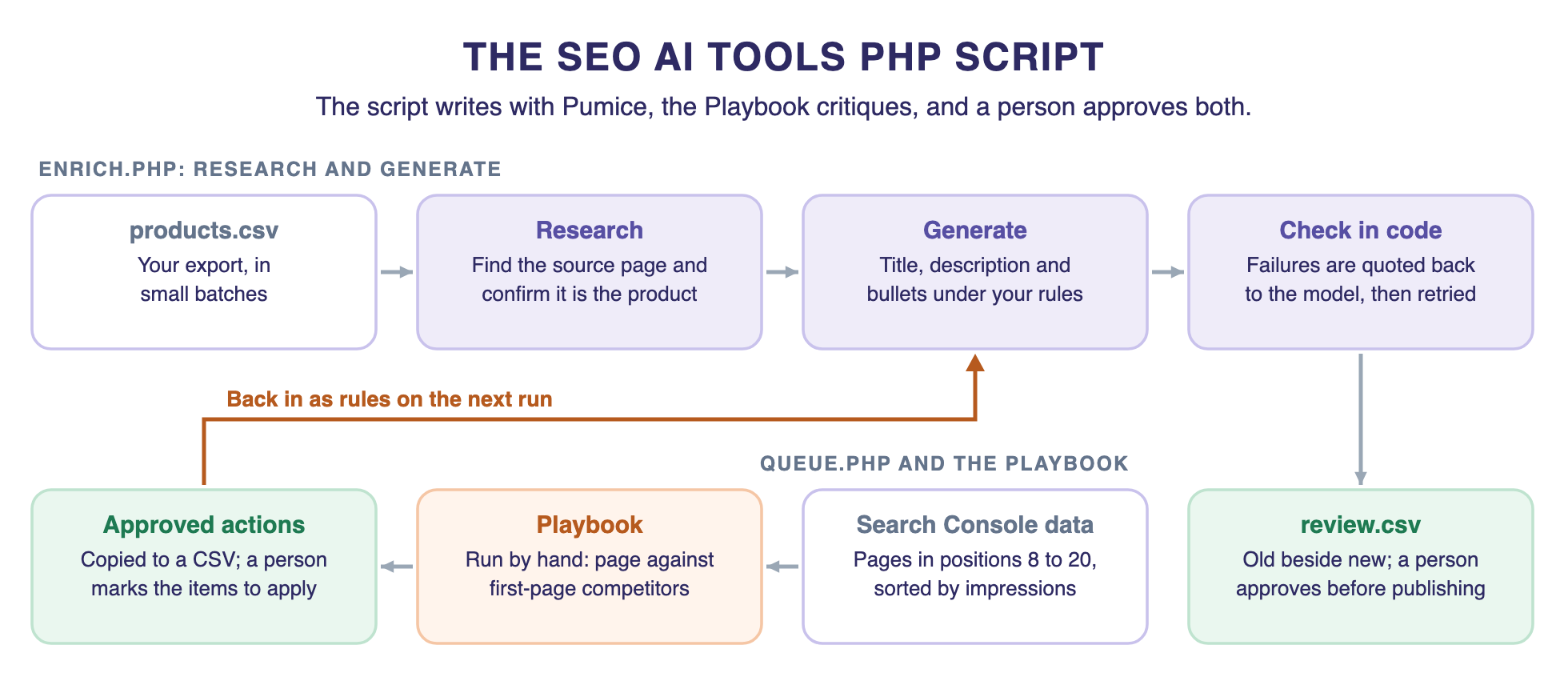
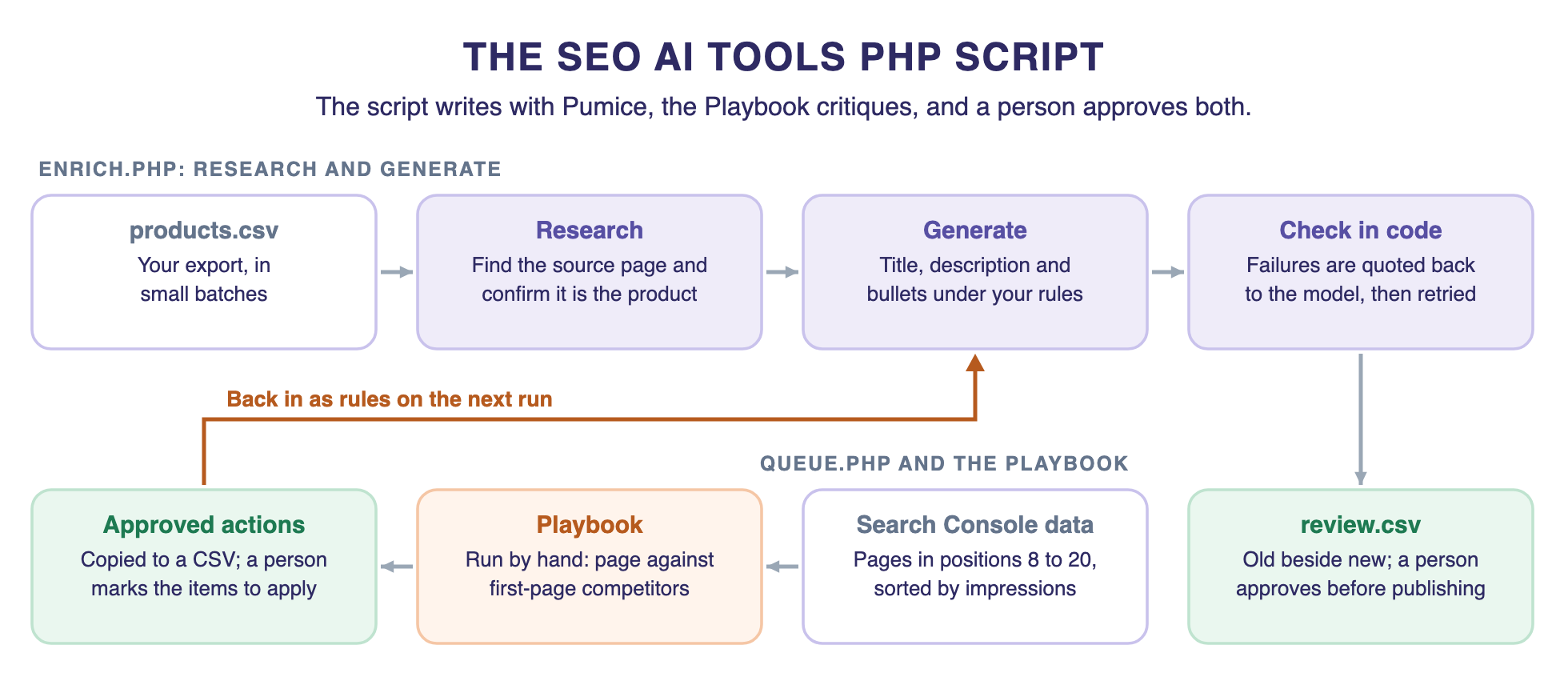
The second route takes about 240 lines of PHP you own. The script calls the Pumice research and generation endpoints behind our Merchandising Pipeline to rewrite each product, then queues your priority pages for the Pumice PDP Optimization Playbook, which compares them with the competitors ranking for their keyword. Nothing goes live until a person approves it.
Key Focus Areas
- A useful SEO script researches each product before it writes anything.
- The Merchandising Pipeline writes; the Playbook critiques one page against its competitors.
- Validation belongs in your code, with failures quoted back to the model.
- Reruns should skip finished SKUs, because each successful call uses credits.
- The script writes to a review file and never publishes on its own.
What an SEO AI PHP Script Should Actually Do
At Pumice, we augment the existing product data first and generate second. Copy written from a thin vendor description can only repeat that description, and so can every other store selling the same product. Research adds the facts a thin vendor feed leaves out.
That gives the script five jobs:
- Read: take a product export, in small batches.
- Research: find the product's source page and confirm it is the same product.
- Rewrite: generate the title, description and bullets under your rules.
- Check: test the output in code, and retry with the failure quoted back.
- Hand off: write new copy beside the old, so a person can review it.
Marketplace scripts have a fair use. If you want to run a public site of free SEO tools, a marketplace script is cheap and quick. It is a different job from improving your own catalog, and any third-party PHP script you host is a security decision, so read the code and keep it patched.
How the Pumice Pipelines Fit Together
The Merchandising Pipeline runs in two phases. The Research Phase adds to your data, and the Generation Phase writes from it. The PDP Optimization Playbook does a different job: it takes a page's title, description, attributes and target keyword, and compares them with first-page competitors. Our guide to optimizing an ecommerce product page for SEO covers it in depth.
The short version: the pipeline writes and the Playbook critiques. The Playbook returns action items, each with the action, the evidence, a threshold check and the reasoning. It does not invent product facts or rewrite the page. Your next script run applies the changes you approve.
Build the SEO AI PHP Script, Step by Step
You need PHP 8.3 or later with the cURL and mbstring extensions, and a Pumice API key. Every Pumice endpoint here is a POST with a JSON body, as listed in the Pumice API reference.
Step 1: Keep the API Key Out of Your Code
Create a key in your Pumice dashboard under Settings, then API Keys. Store it in an environment variable, and never put it in client-side code or commit it to a repository.
export PUMICE_API_KEY=your-keyThe finished project is three files and a few CSVs. pumice.php is the client, enrich.php researches and writes, and queue.php picks the priority pages for the Playbook. Keep them in a folder outside your web root, so nothing here can be reached from a browser.
Step 2: Write a Small Client With Retries
This class wraps PHP's cURL functions. Timeouts are generous because research and generation can be slow. A 429 or a server error gets another try with a growing wait, and failed requests are not billed. A 422 will fail the same way every time, so it stops at once.
The readCsv helper at the top copes with what spreadsheets add to an export, such as Excel's byte order mark and blank lines.
<?php

declare(strict_types=1);

// Reads a CSV as rows keyed by header. Handles Excel's byte order mark, blank lines and multi-line cells.
function readCsv(string $path): Generator
{
    $in        = fopen($path, 'r');
    $header    = fgetcsv($in, escape: '');
    $header[0] = preg_replace('/^\xEF\xBB\xBF/', '', $header[0]);
    while (($row = fgetcsv($in, escape: '')) !== false) {
        if ($row !== [null]) {
            yield array_combine($header, $row);
        }
    }
}

final class PumiceError extends RuntimeException
{
    public function __construct(string $message, public int $status)
    {
        parent::__construct($message);
    }
}

final class Pumice
{
    private const BASE = 'https://app.pumice.ai/api';

    public int $calls = 0;   // successful calls use credits, so count them

    private string $base;

    public function __construct(private string $apiKey)
    {
        $this->base = getenv('PUMICE_BASE') ?: self::BASE;   // tests point this at a local mock
    }

    public function post(string $path, array $body, int $tries = 4): array
    {
        for ($attempt = 1; $attempt <= $tries; $attempt++) {
            $ch = curl_init($this->base . $path);
            curl_setopt_array($ch, [
                CURLOPT_POST           => true,
                CURLOPT_RETURNTRANSFER => true,
                CURLOPT_CONNECTTIMEOUT => 10,
                CURLOPT_TIMEOUT        => 180,   // research and generation can be slow
                CURLOPT_HTTPHEADER     => [
                    "x-api-key: {$this->apiKey}",
                    'Content-Type: application/json',
                ],
                CURLOPT_POSTFIELDS     => json_encode($body, JSON_THROW_ON_ERROR),
            ]);

            $raw    = curl_exec($ch);
            $status = (int) curl_getinfo($ch, CURLINFO_RESPONSE_CODE);

            if ($status === 200 && is_string($raw)) {
                $this->calls++;
                return json_decode($raw, true, 512, JSON_THROW_ON_ERROR);
            }

            // Retry rate limits, server errors and dropped connections. Anything else will fail the same way again.
            $retryable = $status === 429 || $status >= 500 || $status === 0;
            if (! $retryable || $attempt === $tries) {
                throw new PumiceError("$path failed with status $status: " . substr((string) $raw, 0, 200), $status);
            }

            sleep(2 ** $attempt);   // wait 2, 4, then 8 seconds
        }

        throw new LogicException('Unreachable');
    }
}
Step 3: Research Each Product Before Writing
A typical marketplace script does not do this step, and it is what automated product data enrichment depends on. Start a file called enrich.php with your settings and rules. Everything in steps 3 to 5 goes in that file, in the order shown.
<?php

declare(strict_types=1);

require __DIR__ . '/pumice.php';

$apiKey = getenv('PUMICE_API_KEY') ?: exit("Set PUMICE_API_KEY first.\n");
$pumice = new Pumice($apiKey);
$limit  = (int) ($argv[1] ?? 10);   // start small: php enrich.php 10

const MAX_TITLE = 80;
const RULES = [
    'Lead with the brand and product type',
    'Keep the title to ' . MAX_TITLE . ' characters or fewer',
    'Only state facts found in the product data',
    'Write exactly 5 bullets',
];
Your export has columns for sku, brand, title, description, image_url and source_url. If there is no source URL, Universal Search finds one. Smart Scraper then pulls the fields you name in a plain-language prompt.
// Research: find the source page, confirm it is the same product, and keep what it says.
function research(Pumice $pumice, array $item): string
{
    $url = $item['source_url'];
    if ($url === '') {
        $found = $pumice->post('/scraper/universal', ['query' => "{$item['brand']} {$item['title']}"]);
        $url   = $found['results'][0]['url'] ?? '';
    }
    if ($url === '') {
        return '';
    }

    $page = $pumice->post('/scraper/smart-scrape', [
        'prompt'     => 'Extract the title, description, specifications, materials and dimensions',
        'source_url' => $url,
    ]);

    $match = $pumice->post('/product_matching', [
        'product_1'      => "{$item['brand']} {$item['title']}. {$item['description']}",
        'product_2'      => ($page['title'] ?? '') . '. ' . ($page['description'] ?? ''),
        'customer_rules' => ['Same product means the same brand, category and core attributes'],
        'fields'         => '',
        'examples'       => null,
    ]);

    return $match['answer'] === 'yes' ? json_encode($page, JSON_THROW_ON_ERROR) : '';
}
Never trust a scraped page blindly. The matching call asks whether the page is the same product, on brand, category and core attributes. If the answer is no, the script drops that page and writes from your own data. In our test against a local mock of the API, a page for the wrong product was thrown away, and none of its facts reached the prompt.
The scrape prompt is worth tuning for your category. Name the exact fields a shopper needs, such as wattage for lighting or fabric weight for apparel. A narrow prompt gives the model less to get wrong than a request for everything on the page.
Step 4: Generate Under Your Rules, Then Check in Code
Rules go in customer_rules, so the copy follows your brand rather than a generic prompt. The checks run in PHP, because code checks the output and the model does not grade itself. Add a check for any rule you can test, such as banned claims or required product attributes.
// Code checks the output, not the model.
function problems(string $title, array $bullets): array
{
    $found = [];
    if (mb_strlen($title) > MAX_TITLE) {
        $found[] = 'The title is ' . mb_strlen($title) . ' characters; the limit is ' . MAX_TITLE . '.';
    }
    if (count($bullets) !== 5) {
        $found[] = 'There are ' . count($bullets) . ' bullets; write exactly 5.';
    }
    return $found;
}

function generate(Pumice $pumice, array $product, array $rules): array
{
    $issues = [];
    for ($try = 1; $try <= 3; $try++) {
        $body = ['product' => $product, 'customer_rules' => [...$rules, ...$issues], 'examples' => []];

        $title       = $pumice->post('/generate_title', $body)['product_title'];
        $description = $pumice->post('/generate_description', $body)['product_description'];
        $bullets     = $pumice->post('/generate_bullet', $body)['product_bullets'];
        if (is_string($bullets)) {
            $bullets = array_values(array_filter(array_map('trim', preg_split('/\R/', $bullets))));
        }

        $issues = problems($title, $bullets);   // quoted back to the model on the next try
        if ($issues === []) {
            break;
        }
    }
    return [$title, $description, $bullets, $issues];
}
Each failed check goes back to the model as a new rule, up to three tries. In the same mock test, an over-long title came back with the exact failure in the rules and passed on the second try. Anything that still fails is written with a note in the needs_review column, not hidden.
Rules work best when they are specific. "Lead with the brand and product type" gives the model something to follow, and "write compelling copy" does not. Use the examples field to show two or three titles you already like, since a good example often does more than another rule.
The same pattern extends to other fields. The API also has endpoints for attribute generation and extraction, category prediction and rewriting an existing description, so you can add a call to the loop as your needs grow.
Step 5: Write a Review File and Run From the Command Line
Two small helpers read the files the script keeps between runs: the action items a person approved, and the SKUs already finished.
// Rules a person approved from a Playbook brief, by SKU.
function approvedActions(string $path): array
{
    $actions = [];
    if (! is_file($path)) {
        return $actions;
    }
    foreach (readCsv($path) as $action) {
        if (strtolower(trim($action['approved'])) === 'yes') {
            $actions[$action['sku']][] = $action['action'];
        }
    }
    return $actions;
}

// SKUs already in the review file are skipped on a rerun.
function alreadyDone(string $path): array
{
    return is_file($path) ? array_column(iterator_to_array(readCsv($path), false), 'sku') : [];
}
The main loop ties it together. It keeps the old copy beside the new, skips SKUs already in the review file, and stops at once on a bad key, since every SKU would fail the same way.
$done    = alreadyDone('review.csv');
$actions = approvedActions('playbook_actions.csv');
$isNew   = ! is_file('review.csv');

$out = fopen('review.csv', 'a');
if ($isNew) {
    fputcsv($out, ['sku', 'old_title', 'new_title', 'old_description', 'new_description', 'new_bullets', 'needs_review', 'approved'], escape: '');
}

$handled = 0;

foreach (readCsv('products.csv') as $item) {   // sku,brand,title,description,image_url,source_url
    if ($handled >= $limit) {
        break;
    }
    if (in_array($item['sku'], $done, true)) {
        continue;
    }
    $handled++;

    try {
        $facts   = research($pumice, $item);   // add data first, generate second
        $product = [
            'title'       => $item['title'],
            'description' => $facts === '' ? $item['description'] : "{$item['description']}\n\nSource data: $facts",
            'image_url'   => $item['image_url'],
        ];
        $rules = [...RULES, ...($actions[$item['sku']] ?? [])];

        [$title, $description, $bullets, $issues] = generate($pumice, $product, $rules);

        fputcsv($out, [
            $item['sku'], $item['title'], $title, $item['description'], $description,
            implode(' | ', $bullets), implode(' ', $issues), '',
        ], escape: '');
    } catch (PumiceError $e) {
        if (in_array($e->status, [401, 403], true)) {
            exit("Stopping: check your API key. {$e->getMessage()}\n");   // every SKU would fail the same way
        }
        fwrite(STDERR, "{$item['sku']}: {$e->getMessage()}\n");   // log it and keep the batch moving
    } catch (JsonException $e) {
        fwrite(STDERR, "{$item['sku']}: bad JSON, check for non-UTF-8 text. {$e->getMessage()}\n");
    }
}

echo "Handled $handled products with {$pumice->calls} successful API calls.\n";
Start with a handful of products, and read the review file before you go further:
php enrich.php 10Add the PDP Optimization Playbook
Rewriting every page is not the best use of a critique. The Playbook is a focused pass on the pages that matter, so the script picks them first. Pull page and query rows through the Search Console API, join them to your SKUs, and keep the product detail pages in positions 8 to 20.
Those pages already have demand and are close to the top, so they are usually the best place to start. This is guidance, not a guarantee.
<?php

declare(strict_types=1);

require __DIR__ . '/pumice.php';

// pages.csv: Search Console page and query rows joined to your SKUs.
// Columns: sku,url,target_keyword,position,impressions,title,description,attributes
$pages = iterator_to_array(readCsv('pages.csv'), false);

// Pages close to the top, with real demand, are usually the best place to start.
$queue = array_filter($pages, fn ($p) => $p['position'] >= 8 && $p['position'] <= 20);
usort($queue, fn ($a, $b) => (int) $b['impressions'] <=> (int) $a['impressions']);

$out = fopen('playbook_queue.csv', 'w');
fputcsv($out, array_keys($pages[0]), escape: '');
foreach (array_slice($queue, 0, 25) as $page) {
    fputcsv($out, $page, escape: '');
}

echo 'Queued ' . min(25, count($queue)) . " pages.\n";
Run each queued page through the Playbook in Pumice, using the title, description, attributes and target keyword from the queue file. The Playbook returns a structured PDF report. Copy the action items you want to consider into a file called playbook_actions.csv, one row per item. Keeping the four parts together lets a reviewer see why each change is suggested, such as how many ranking competitors do the same thing:
sku,action,evidence,threshold_check,reasoning,approvedA-100,"Add the wattage to the title","Competitors state the wattage in their titles","7 of 10 competitors do this","Shoppers compare lamps on brightness",Then a person takes over. Open playbook_actions.csv, set approved to yes on the items you accept, remove those SKUs from review.csv so they are not skipped, and run enrich.php again. It also picks up other unfinished SKUs, up to the limit. Approved actions join the customer_rules for that SKU only, so the script writes and the Playbook critiques in a loop you control.
The Playbook suggests changes, and it does not supply facts your product lacks. If an action item needs a spec you do not have, get it from the source first.
Run the Script on a Schedule
Once the output looks right, run the script in small batches with cron. Because finished SKUs are skipped, a nightly job works through the catalog and picks up where it stopped.
PATH=/usr/local/bin:/usr/bin:/bin
PUMICE_API_KEY=your-key

# 2 a.m. daily, 200 products
0 2 * * * cd /var/app/seo && php enrich.php 200 >> enrich.log 2>&1
Cron does not read your shell's variables, so set the path and the key at the top of the crontab, and keep that crontab private. The Playbook step stays out of cron on purpose: a person runs it and decides which action items become rules.
Publishing stays a separate step on purpose. Once a reviewer has marked rows in the approved column of review.csv, map the new columns to your fields and import them with the tool you already trust, such as WooCommerce's product CSV importer with its option to update existing products. Keep the old columns as your rollback.
Three habits keep this safe. Watch your credits, because each successful call uses them, and a product takes five or six calls, or up to twelve when generation retries. enrich.php prints its count when it finishes. Read the log, since skipped SKUs are written there. And keep review in the loop: this script never touches your store.
Run it on a patched PHP. October's PHP2Shell flaws, CVE-2026-109618 and CVE-2026-109619, are fixed in 8.5.12, 8.4.27, 8.3.36 and 8.2.35, so take the newest release in your branch. These flaws are attacked through web requests, so the risk sits with servers that run PHP for a public site. That applies to anything hosted there, bought or built.
Own Your SEO AI Tools PHP Script
An SEO AI tools PHP script earns its place when it knows your products. This one researches each item, writes under your rules, checks its own work, and applies the Playbook fixes you approve, in code you can read.
Generic copy is what you get when every store uses the same tool on the same vendor data. Adding to your data first is how a page gives shoppers and search engines something a vendor feed alone cannot.
FAQ
What is the best SEO AI tools PHP script?
It depends on the goal. To run a public site of free SEO tools, a marketplace script is the quick route. To improve your own product pages, a short script on a product data API serves you better.
Can I automate SEO with PHP?
Yes. PHP can read your catalog, call APIs for research and generation, check the results and write them to a review file on a schedule. Keep a person approving changes before they go live.
Do I need to know Python to use the Pumice API?
No. The API is plain HTTPS with JSON, so PHP's cURL extension handles the calls. The same calls work from any language.
Is it safe to use a marketplace PHP script?
It can be, if you read the code, keep it updated and run it on a patched PHP. Any script you host can reach your server and your data, so treat it like any other dependency.